Features
Spend less time on paperwork.
Capture, find, automate and control every document, on your PC, on your own servers or in the cloud.
Capture
Someone sorts and keys in paper all day.
Paper in, organized files out.
Split, sort and name
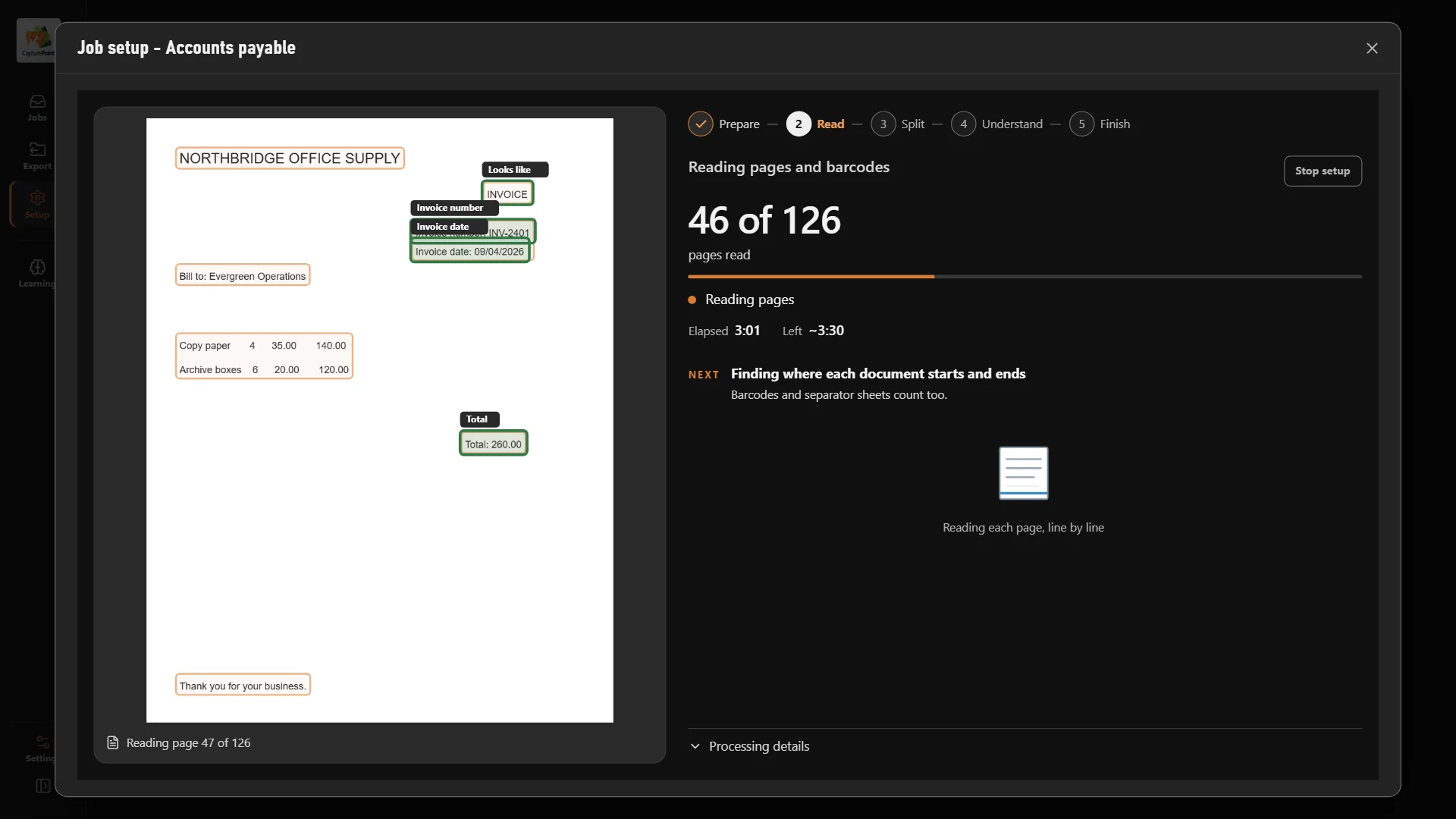
Scan a whole stack. Each document is split out, sorted by type and named for you.
- CapturePoint 6
- Paige
Fields and line items
Names, dates, totals and full line-item tables, read straight off the page.
- CapturePoint 6
- Paige
Every way documents arrive
Bring in documents from scanners, email and watched folders.
- Content Central
Find
Nobody can find the file they need.
Any document, in seconds.
Full-text search
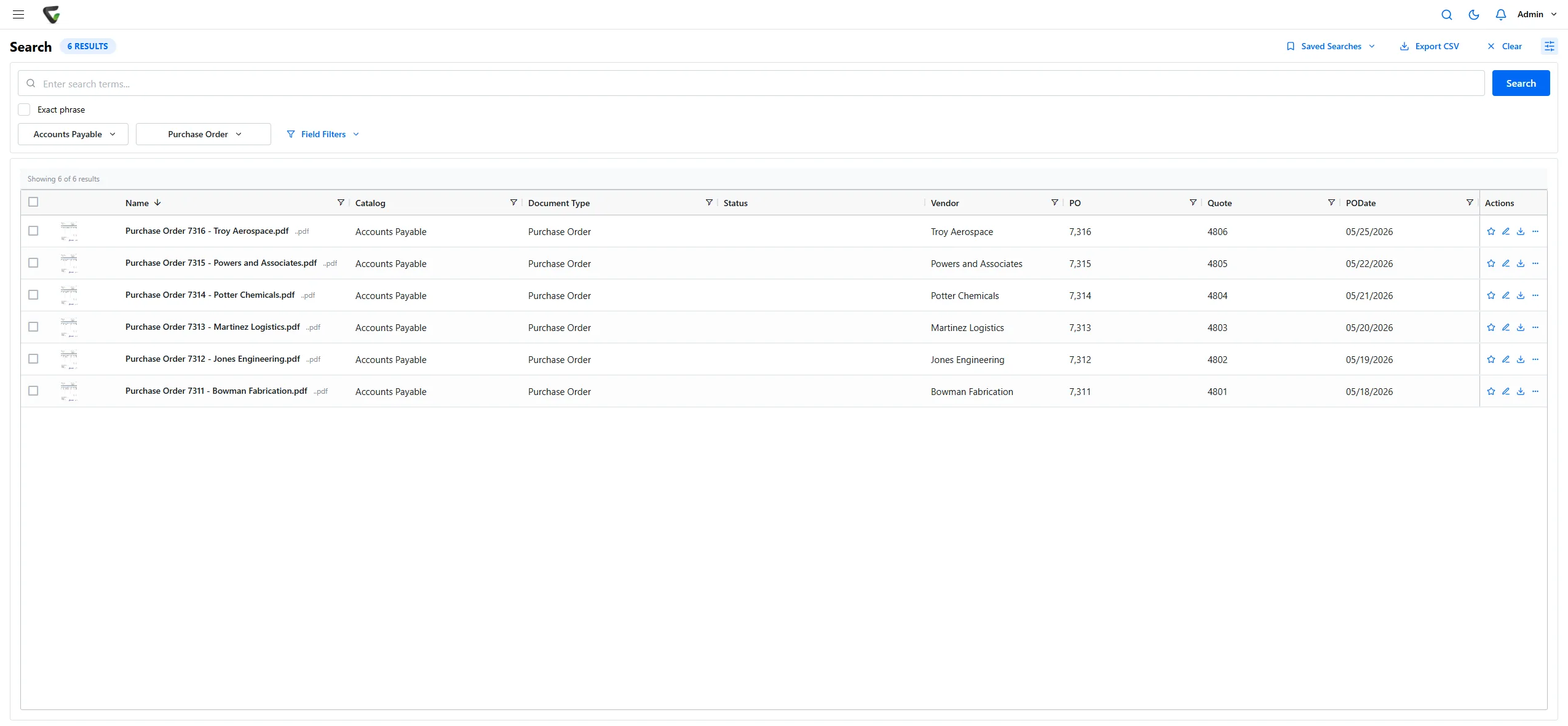
Search the words inside every document, not just the file name.
- Content Central
- Nucleus One
Version history
Every version kept, so you can see what changed and go back.
- Content Central
- Nucleus One
Searchable PDFs
Scanned pages are filed as searchable PDFs with their data alongside.
- CapturePoint 6
Automate
Approvals stall in somebody’s inbox.
The work moves itself.
Workflows and approvals
Route documents to the right people automatically and see where each one stands.
- Content Central
- Nucleus One
E-signatures
Get documents signed without printing, scanning or chasing.
- Content Central
- Nucleus One
Tasks and forms
Collect information with forms and keep the follow-up on track with tasks.
- Nucleus One
AI inside the process
AI reads and decides, looks up and fills in data, routes work and moves information between your systems.
- Content Central
- Cortexa
Control
An audit means days of digging.
Audit-ready, every day.
Permissions and audit trail
Decide who sees what, with a full audit trail of who did what and when.
- Content Central
Retention by policy
Keep each record exactly as long as your rules say, then dispose of it on schedule.
- Content Central
Your sign-in
Active Directory, SAML single sign-on and multi-factor authentication.
- Content Central
Sends it where you work
Your documents land right where your team already looks.
Reading happens on your PC. Every finished document is then named and filed as a searchable PDF in your own folders or Content Central, and can also go to SharePoint or OneDrive, Google Drive, Dropbox or Nucleus One.
 SharePoint and OneDrive
 Google Drive
 Dropbox
- Your own folders
SharePoint and OneDrive need a Microsoft 365 work or school account. Need another system? Tell us where your documents need to go.
Business systems
QuickBooks, Sage 50 and X3, Workday, Epicor, Dynamics CRM and a REST API.
- Content Central
Client portals and mobile
Share files with clients through portals, and work from iOS and Android apps.
- Nucleus One
Data where you need it
Results by download, SFTP or webhook, or connect apps with Zapier and the REST API.
- Paige
- Nucleus One
Run it your way
Your PC, your servers or the cloud.
On your PC
CapturePoint 6 runs cutting-edge document AI on your own Windows PC. Nothing goes to the cloud.
- CapturePoint 6
On your servers
Cortexa runs on hardware you own, and Content Central can too, so documents stay in your building.
- Content Central
- Cortexa
In the cloud
Nucleus One and Paige run on Google Cloud, whose infrastructure is SOC 2 / ISO 27001 certified. Content Central runs in the cloud too.
- Content Central
- Nucleus One
- Paige
Fortune 500 companies and government agencies run on Ademero; their security, IT and legal teams review us every year and keep renewing. We sign HIPAA BAAs. Trusted by 1,000+ organizations since 2002.
Go deeper on one feature.
- Workflow automationApprovals, reminders and signatures that run themselves.
- Version controlEvery version kept, the current one always clear.
- Audit trailWho did what to every document, and when.
- Encryption and securityYour PC, your servers or Google Cloud, under your control.
- Records retentionKeep each record as long as your rules say, then dispose of it on schedule.
- AnalyticsDashboards that show where every document stands.
Feature questions
Which product should I start with?
If you have paper to scan, start with CapturePoint 6. If you want full document management, in the cloud or on your own servers, look at Content Central. For a lighter cloud app you can start free, try Nucleus One. To pull data out of documents in the cloud, use Paige. For private AI on your own servers, working inside your document processes, talk to us about Cortexa.
Can I try these features before I buy?
Yes. The CapturePoint 6 free trial starts the first time you open it, with no form, and you can start Nucleus One and Paige free with no credit card. For Content Central and Cortexa, we set up a free live demo with your own documents.
Does Ademero help with compliance?
Yes. Permissions, audit trails, versions and retention help you meet HIPAA, SOX, GDPR and FERPA requirements, and we sign HIPAA Business Associate Agreements.
Do the products work together?
Yes. CapturePoint 6 files documents straight into Content Central and Nucleus One, Content Central connects to Nucleus One, and Cortexa is the AI inside CapturePoint 6 and Paige and connects to Content Central and Nucleus One.
Free live demo
See these features work on your own documents.
Book a free demo and we will show you around, answer your questions and run your real paperwork through it. No cost, no pressure.
- A live tour of the products that fit your work
- Your own documents, set up and shown working
- Your workflow and process, mapped with you
- Straight answers from people who build it
