Paige · powered by Cortexa AI
Stop typing in invoices.
Send in your documents and get clean data back, down to every line item. Show Paige a few samples and it runs on its own.
Add a few samples and Paige sets up the job for you.
- No templates to build
- Every feature on every plan
- Runs on Google Cloud
Someone on your team types in invoices all day.
Every document is keyed in by hand.
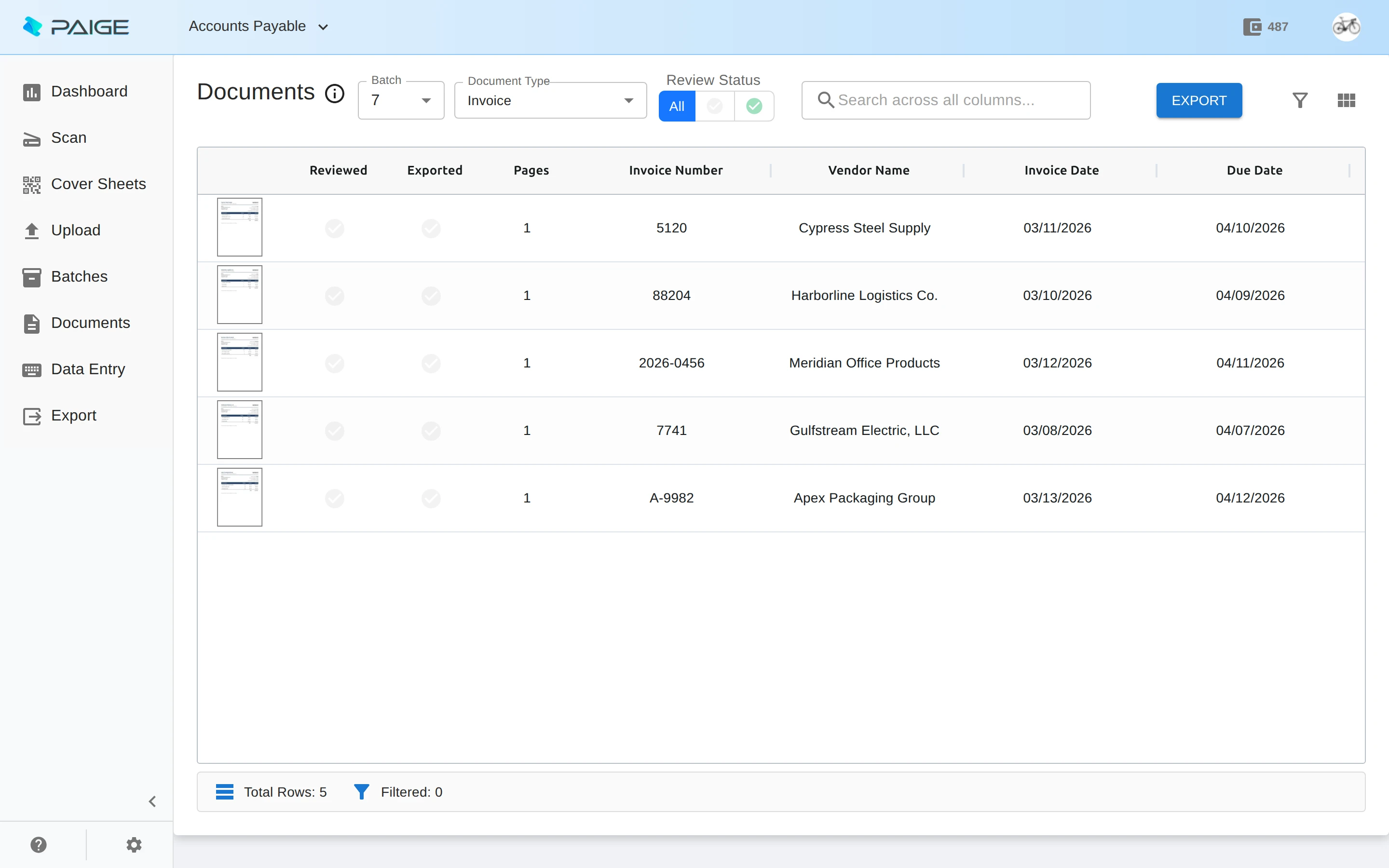
Paige reads the fields and every line item for you.
One long scan holds fifty documents.
It finds where each one starts and ends, and sorts them by type.
Templates break when a vendor changes its layout.
There are no templates. Paige learns from a few samples.
Line items
Every field. Every line.
Vendor, dates, totals and purchase order numbers, plus the full line-item table, read from each document and ready to export.
- Each value shown with where it came from on the page
- A searchable PDF with the data inside
- JSON with every field and line item
No setup
Teach it, then let it run.
Drop in a handful of samples and Paige proposes the document types and fields. While you review, every correction makes the job smarter. When it is ready, switch it to automatic and only exceptions come to you.
- Exceptions arrive with the reason, in plain words
- One click puts a job back under review
Every job, four stages
- 01SetupPaige proposes types and fields from your samples. You confirm.
- 02TeachingYou review documents. Every correction is learned.
- 03SupervisedIt exports on its own. You see a sample and the exceptions.
- 04AutomaticEverything flows. Only exceptions need a person.
From paper to data
In from anywhere, out to your systems.
Documents come in every way your team already works, and clean data goes out to wherever it is needed.
Every way in
Upload in the browser, email documents to the job’s own address, scan, watch a folder, or send them by API.
Fields and line items
Names, dates, totals, numbers and full line-item tables, each value shown with where it came from on the page.
Splits the stack
Drop in one long scan. Paige finds where each document starts and ends and sorts them by type.
Learns from you
Every correction teaches the job, until it is ready to run on its own.
Clean output
A searchable PDF with the data inside, plus a JSON file with every field and line item.
Delivered for you
Download, SFTP or a signed webhook, or straight into Content Central or Nucleus One.
See it all
Know where every document is.
The dashboard shows what came in, what is waiting for review and what has gone out, job by job.
- Scan from the browser with Paige Scan for Windows
- Watch a folder for new files
- Every job gets its own email address
How you buy it
Start free. Grow when you need to.
Sold as monthly plans sized to your document volume.
- Unlimited people, jobs and features on every plan
- A searchable PDF and JSON for every document
Security
Your documents, kept safe.
Paige runs on Google Cloud, whose infrastructure is SOC 2 / ISO 27001 certified. Data is encrypted at rest, sign-in supports two steps, each company sees only its own jobs, and you choose how long each job keeps documents after export.
CapturePoint 6 · local AI on your PC
Want it on your own PC instead of the cloud?
CapturePoint 6 runs the same kind of cutting-edge document AI right on your Windows PC. Nothing leaves the building, and one flat price per station covers unlimited scanning.
Paige questions
What is Paige?
Paige is Ademero’s cloud document processing service, powered by Cortexa AI. It splits, classifies and reads your documents, extracts fields and line items, and delivers clean data and searchable PDFs to your systems. You teach a job with a few samples, then it runs on its own.
How much does Paige cost?
Every plan includes unlimited people, jobs and features. Paige is sold as monthly plans sized to your document volume. Tell us about your setup on the pricing page and we will send pricing that fits, or book a free live demo and we will walk you through it.
Do I have to build templates?
No. Add a few sample documents and Paige works out the document types, fields and tables for you. You confirm or correct, and it learns from every correction.
Can I scan paper into Paige?
Yes. Paige Scan is a small Windows app that connects your scanners to Paige, scans straight into a job, and can watch a folder so files are picked up on their own.
Does Paige have an API?
Yes. Paige has an API for sending documents in and collecting the results, and the reference is in the app under Developers. Ask us which plan fits your volume.
Where does Paige run, and how is my data protected?
Paige runs on Google Cloud, whose infrastructure is SOC 2 / ISO 27001 certified. Your data is encrypted at rest, each company is isolated from every other, sign-in supports two-step verification, and you choose how long each job keeps documents after export.
Already using Paige? Step-by-step help for sending documents in and getting your data out.
How-to guidesFree live demo
Want us to run your documents through Paige?
Book a free demo and we will show you around, answer your questions and run your real paperwork through it. No cost, no pressure.
- A live tour of the products that fit your work
- Your own documents, set up and shown working
- Your workflow and process, mapped with you
- Straight answers from people who build it

Sell Paige to your own customers? See the partner program