AI use cases
The paperwork AI takes off your plate.
Before and after views of real document work in six industries, each paired with the Ademero product that does it.
CapturePoint 6 free trial: no form, it starts the first time you open it.
Before and after
Pick your industry.
Manufacturing
Supplier invoices
Before
- Clerks key invoices by hand
- Line items retyped one by one
- Paper piles up at month end
After
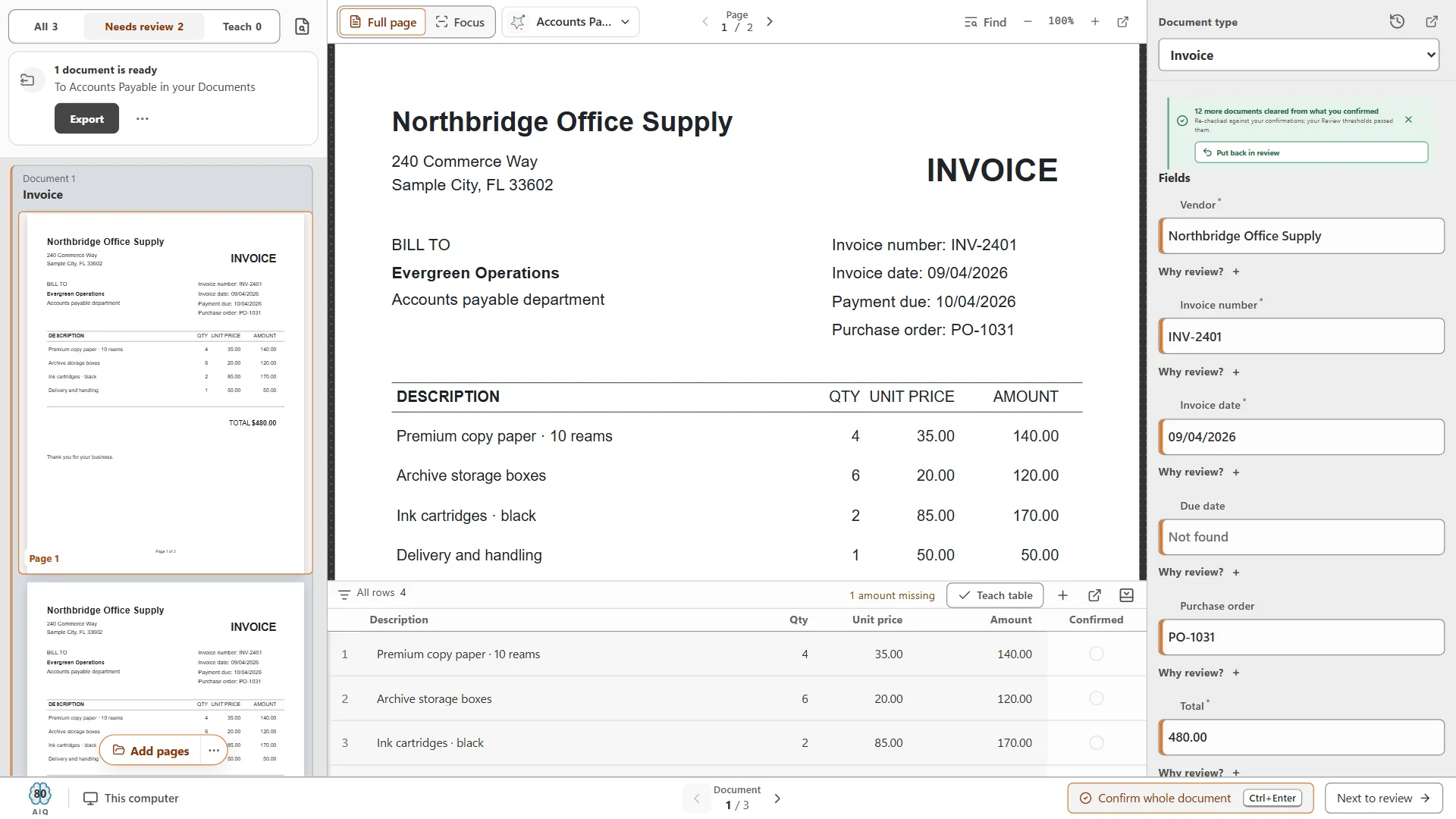
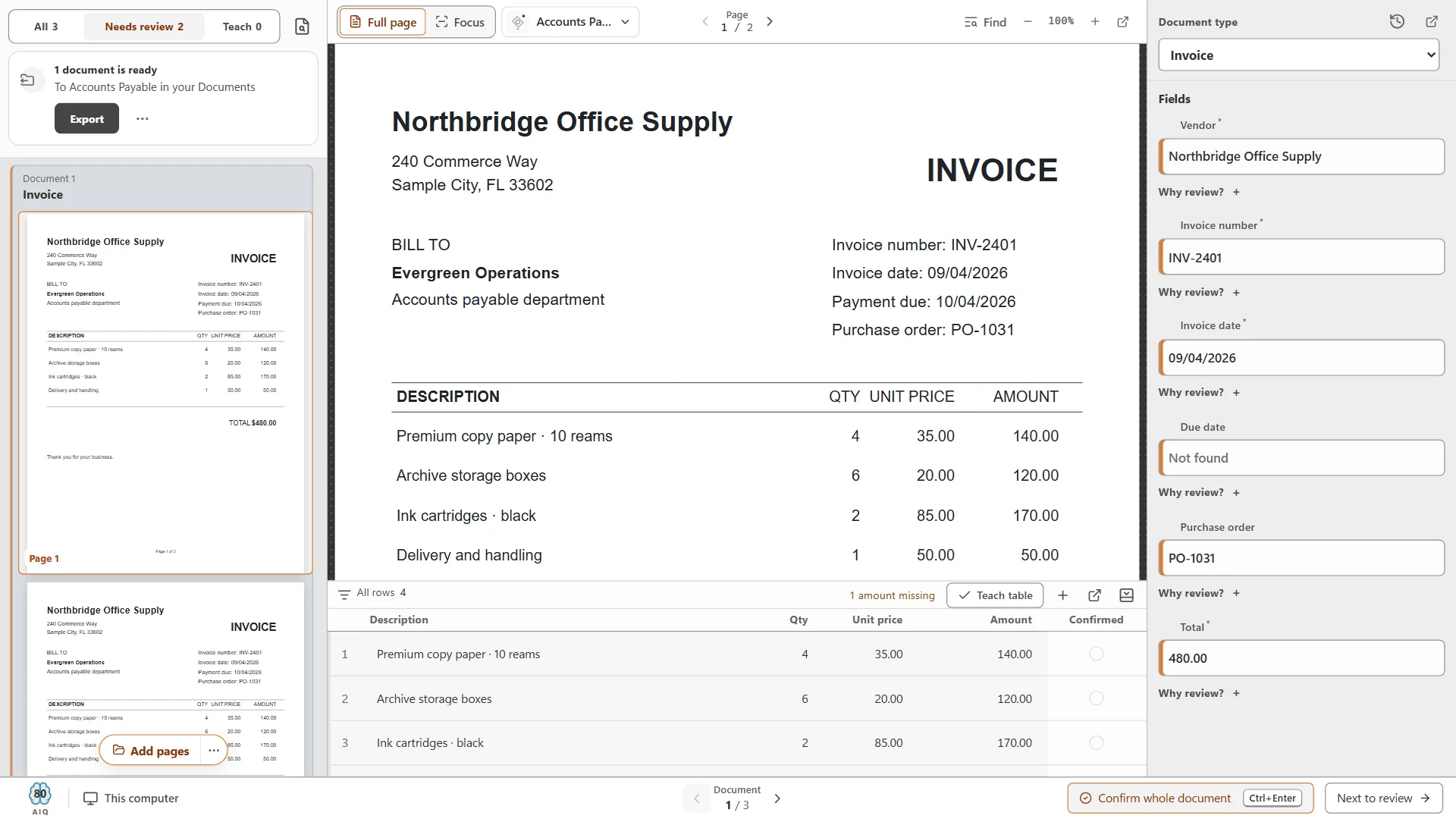
- Vendor, totals and line items read on arrival
- Line items that do not add up sent to a person
- Values exported in a data file for your system
Manufacturing
Quality and compliance records
Before
- Binders on the shop floor
- Copies spread across shared drives
- Audits mean days of digging
After
- Every record scanned, named and filed
- Found by what it says
- Versions and an audit trail on every page
Retail
Vendor invoice processing
Before
- Hundreds of vendor layouts
- An inbox full of PDFs
- Retyping into accounting
After
- Every layout read the same way
- Fields and line items in one format
- Delivered by download, SFTP or webhook
Built withPaigeRetail
Packing slips and receiving
Before
- Slips taped to boxes
- Receiving logs kept by hand
- Hard to find a slip when a vendor disputes
After
- Order number, ship date and cartons read
- Each slip named and filed by order
- Found again by what it says
Healthcare
Patient intake forms
Before
- Clipboards and retyping
- Forms misfiled or lost
- Staff time spent on paper
After
- The packet split into its forms
- Each form read and filed to the patient
- Kept in the cloud or on your own servers
Healthcare
Records and referrals
Before
- Faxes and file rooms
- Hard to find the right record
- Who opened what is unclear
After
- Searchable by what it says
- Permissions and MFA on every record
- A full audit trail. We sign BAAs
Finance
Loan file processing
Before
- Sorting stacks by hand
- Missing pages found late
- Files rebuilt for every audit
After
- The package split, sorted and named
- Every document filed to the borrower
- Audit-ready with versions and retention
Finance
W-9s and vendor files
Before
- W-9s keyed into the vendor master
- Forms filed in a drawer
- Hard to find one at 1099 time
After
- Name, business name and tax classification read
- Each W-9 named and filed to the vendor
- Kept with permissions and an audit trail
Logistics
Bills of lading and proof of delivery
Before
- Paper from the road
- Drivers hand in crumpled stacks
- Billing waits on paperwork
After
- Scanned and read the day it arrives
- BOL, PRO and shipment numbers read off each page
- Named and filed so billing can find them
Logistics
Rate confirmations and freight invoices
Before
- Confirmations buried in email
- Load numbers retyped
- Invoices filed apart from the load
After
- Load number, carrier, rate and equipment read
- Invoice number, dates and terms read
- Both named by load and filed together
Built withCapturePoint 6Education
Admissions applications
Before
- Folders on every desk
- Transcripts arrive in pieces
- Applicants wait on paperwork
After
- Applications scanned and sorted
- Each document filed to the applicant
- Reviews routed in a workflow
Education
Student records
Before
- Filing cabinets of records
- Requests take days
- Access is hard to control
After
- Records searchable in seconds
- Permissions that help you meet FERPA
- Kept in the cloud or on your own servers
Local AI
Cutting-edge AI. No data center required.
CapturePoint 6 puts a complete document AI on the Windows PC next to your scanner. It is the most accurate document AI we have ever measured, and it does all of its reading right there, without sending a page out to be read.
The AI comes to you
A one-time download installs the full document AI on your PC. Every page is read and understood right there, not sent to a cloud service to be read.
Fast on the PC you have
It runs with or without a graphics card. Add one and Speed boost switches on by itself. It measures your machine and tunes itself to it.
No per-page AI bill
One flat price per PC with unlimited scanning. Run ten pages or ten thousand, and the price stays the same.
Smarter every day
It learns from every correction you confirm. The longer it runs, the more it takes care of on its own.
Windows 10 or 11, 64-bit. A graphics card is optional.
What after looks like on screen.
The products
Three ways to put AI on your documents.
Same AI, three places to run it. Pick the one that fits where your documents have to stay.
CapturePoint 6 · On your own PC
Document AI that runs next to your scanner.
Splits, sorts, reads and names every document right on your Windows PC. No data center, no per-page AI bill, and nothing sent out to be read.
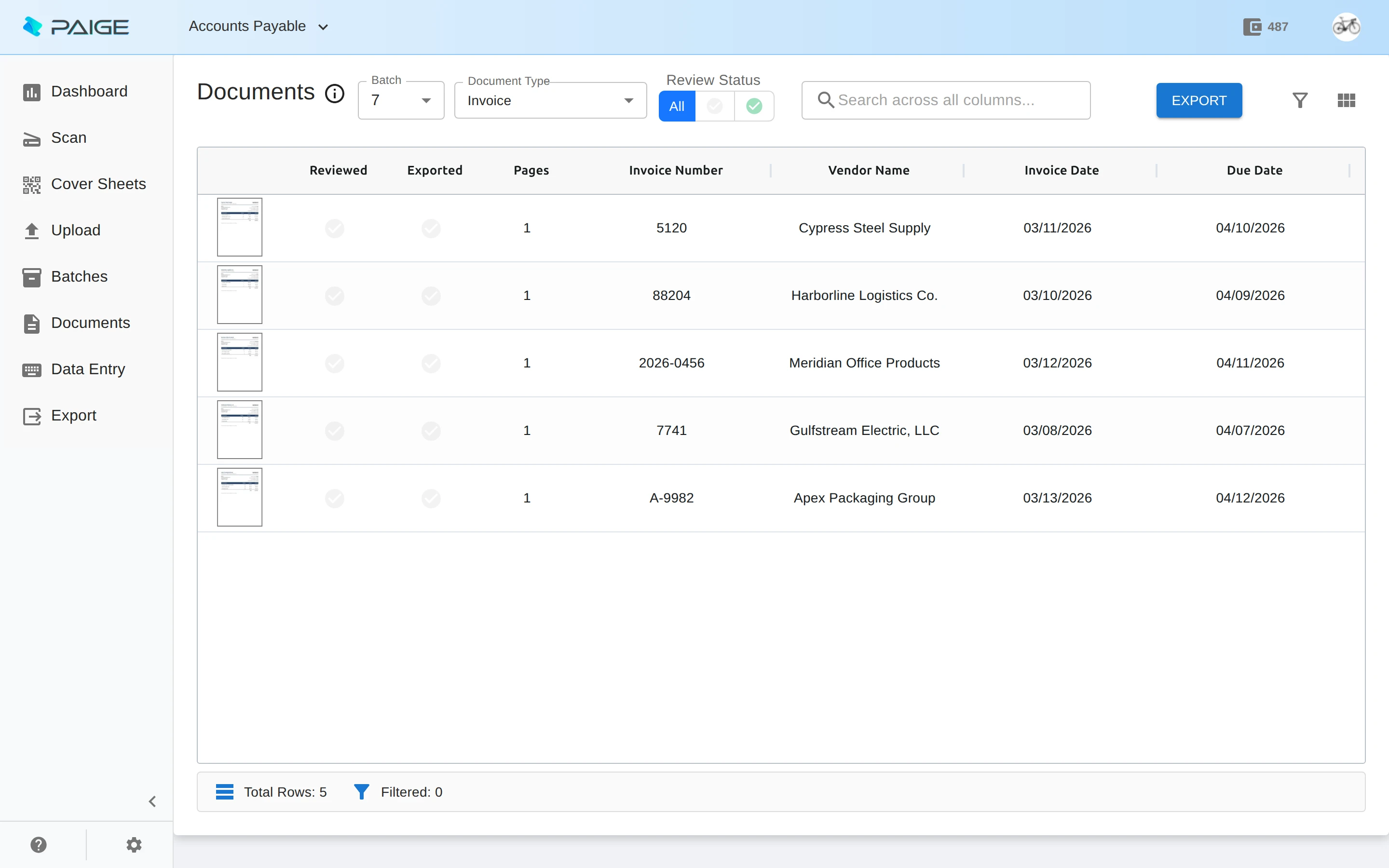
Paige · In the cloud
Send in documents. Get clean data back.
Learns your documents from a few samples, then pulls fields and line items and delivers them by download, SFTP or webhook.
Cortexa · On your own servers
Private AI inside your own walls.
Our private AI platform, on servers you own. It is the AI inside CapturePoint 6 and Paige, and it connects to Content Central and Nucleus One so AI can work inside your document processes, with private team chat and custom AI tools built with our team.
Trusted by 1,000+ organizations since 2002.
Fortune 500 companies and government agencies run on Ademero. Their security, IT and legal teams review us every year and keep renewing.
- Organizations
- 1,000+
- Building document software since
- 2002
- We sign them
- HIPAA BAAs
Free live demo
Show us yours. We will show you the after.
Book a free demo and we will show you around, answer your questions and run your real paperwork through it. No cost, no pressure.
- A live tour of the products that fit your work
- Your own documents, set up and shown working
- Your workflow and process, mapped with you
- Straight answers from people who build it
