Records retention
Keep every record exactly as long as your schedule says.
Set how long each kind of record is kept, once. Content Central counts down every document of that type, holds the ones a lawsuit or audit needs, and clears the rest on the schedule you choose.
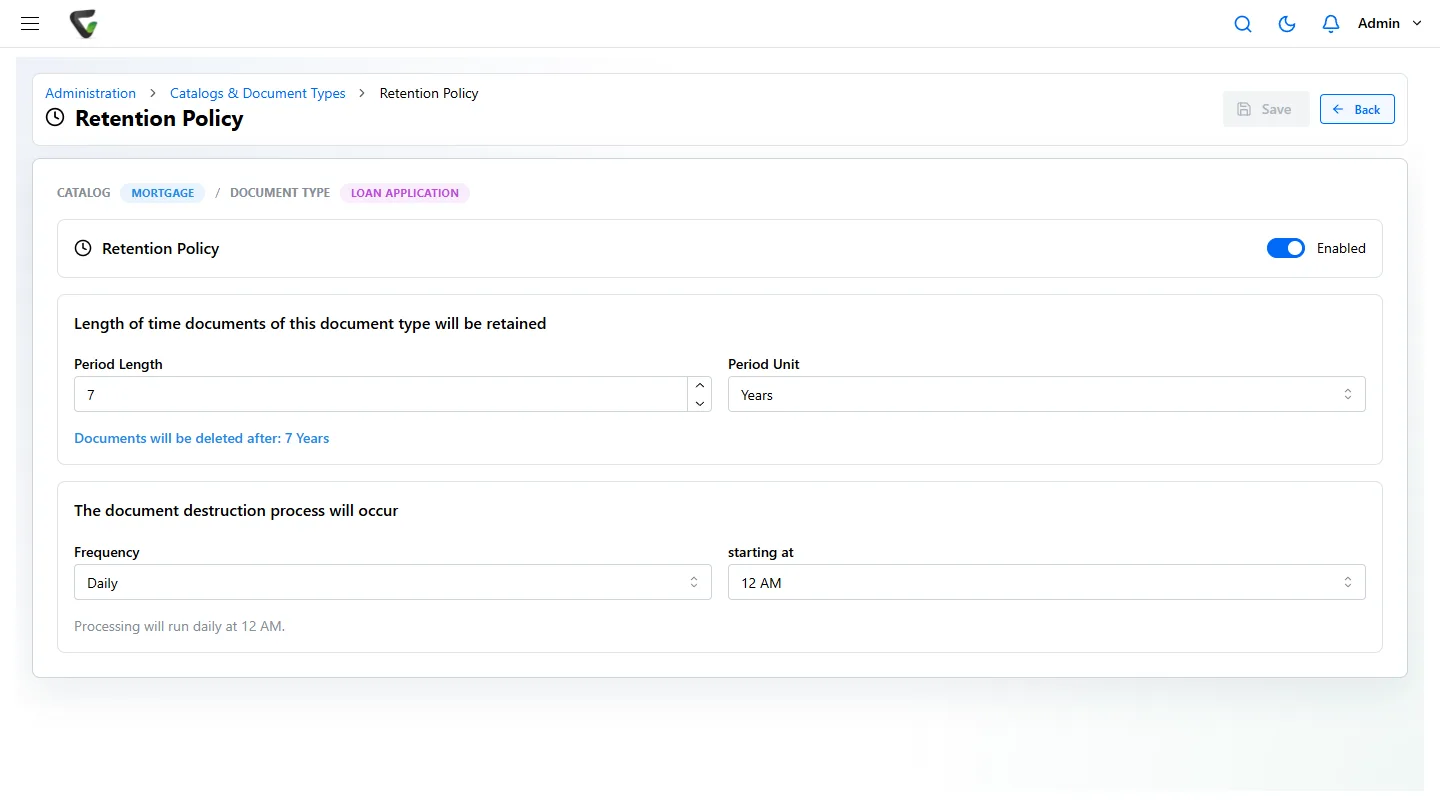
- 1Each policy belongs to one document type in one catalog. Here: Loan Application in the Mortgage catalog.
- 2The period, in days, weeks, months, quarters or years. Content Central counts it from the day each document was added.
- 3When the clearing run happens: how often, which day and what time. Here, every night at midnight.
Schedule, policy, hold, clearing.
Four steps, four different people. The example is a job application, which federal rules say to keep one year unless a charge is filed.
Schedule
Your schedule says what to keep and for how long. It comes from the rules you live under and your own policy, approved by whoever owns records.
Policy
An administrator enters each line once, as a retention policy on the matching document type, with a period and a clearing schedule.
Hold
Anyone with the Allow Retention Overrides permission can keep a document past its date. Each override records who made it.
Clearing
The clearing run removes what has expired, on the frequency, day and time you set. Held documents are skipped.
Five lines from a real schedule, and how each one is set.
- Job applications and hiring records1 year from the record or the hiring decision, longer if a discrimination charge is filedEEOC, 29 CFR 1602.141 Year on the application type. Hold any that a charge touches.
- Payroll records3 years from the last entryFLSA, 29 CFR 516.53 Years on the payroll type.
- HIPAA policies and documentation6 years from creation or when last in effect45 CFR 164.316(b)(2)6 Years on the policy type; set a longer period on a policy still in effect.
- Tax returns and supporting records3 to 7 years depending on the situation; 7 covers every IRS periodIRS7 Years on the tax and supporting types.
- Form I-93 years after hire or 1 year after employment ends, whichever is laterUSCIS, 8 CFR 274a.2Counted from an event, not filing. See below.
Federal periods from our retention schedules page. State rules and your own policy may ask for longer; your records owner and counsel decide.
When the clock starts at an event, not at filing
An I-9 depends on when someone leaves, which nobody knows the day it is filed. Keep that type without a fixed period, and when employment ends give that document its own period with Retain for, long enough to cover the rule. Or let a scheduled workflow rule find documents by a date field, such as a termination date, and archive or delete them once the time has passed.
Legal holds
The hold is a setting on the document, not an email to the records room.
- 01
Find everything the matter touches.
Search every catalog you may see by name, number or any word in the documents.
- 02
Set them to Retain Indefinitely.
The document-level setting overrides its type’s schedule, so the clearing run skips it.
- 03
Know who did it.
Only people with the Allow Retention Overrides permission can, and each override records who made it in the document’s history.
- 04
Release it when the matter closes.
Change the override again and the documents go back on a schedule.
See what is due before anything is removed.
The Retention Policies page lists documents with the time each one has left. Anything pending removal shows in red, so the records manager can check the list, and place a hold, before the run.
Prefer to move old records out of the way rather than delete them? A workflow rule on document age can move them to an archive folder instead.
- Loan Application · 1882-0417Mortgage · Policy 7 YearsPending removal
- Loan Application · 1904-0233Mortgage · Retain IndefinitelyOn hold
- Loan Application · 2117-0098Mortgage · Policy 7 Years3 years left
- A sketch of the kind of list the Retention Policies page shows. Loan numbers are examples.
Write the schedule first.
Content Central enforces a schedule; it does not decide one for you. These three will get you to a draft.
- 1Retention schedulesFederal retention periods by record type, with the rule behind each one.
- 2Retention policy generatorPick your record types and get a starting policy to review.
- 3Records retention policy templateA full policy document to adapt, approve and adopt.
Retention is one of the compliance controls in Content Central, alongside the audit trail and permissions.
Bring your schedule. We will set up three of its lines in a free demo.
Content Central runs in the cloud or on your own servers, your choice. Ademero has served 1,000+ organizations since 2002.