Community and regional banks · lending
From the lender's desk to the examiner's sample, one loan file.
The package is scanned at the branch, filed by loan number, checked for what is missing, approved, closed and kept on its own schedule. When the exam letter lists thirty loans, each one is a search away.
One package, six hands
Where a consumer loan package goes, and who touches it.
- 1
Branch lender
Meets the borrower and collects the application, two pay stubs, last year’s W-2 and two months of bank statements. Today half of it arrives by email after the meeting.
With AdemeroPaper goes through the branch scanner. The borrower’s emailed documents land in a monitored mailbox and are filed the same way.
- 2
Branch scanner
The whole package goes in as one stack, in whatever order it came.
With AdemeroCapturePoint 6 splits the stack and recognizes each document on the branch PC. Pay stubs and statements never print your loan number, so it comes from a barcode cover sheet or a lookup in your pipeline export.
- 3
Loan operations
The processor needs to know what is still missing before underwriting will look at it.
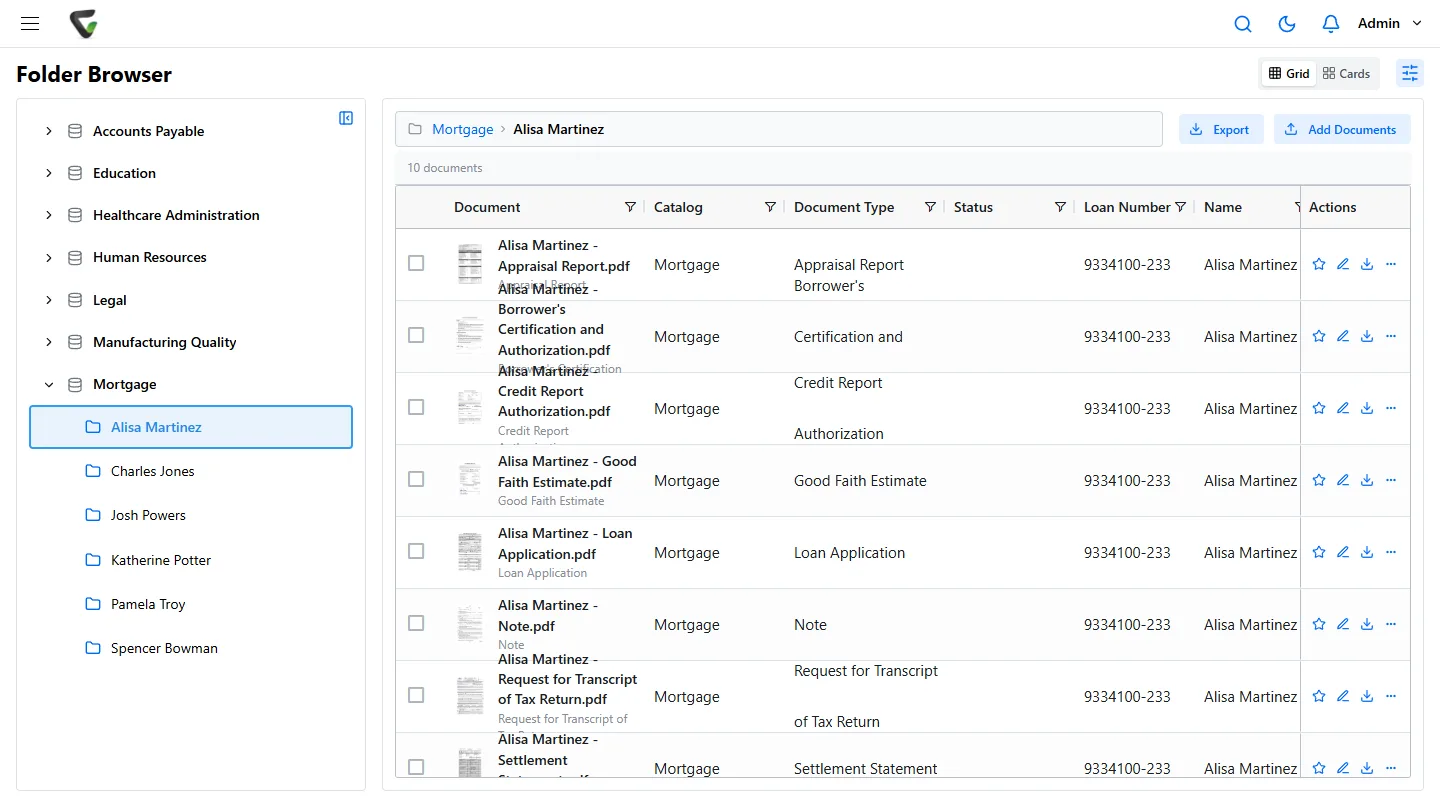
With AdemeroEvery document carrying the loan number joins one loan file. The file says Incomplete and lists the missing types by name.
- 4
Underwriting and approval
The credit decision, and for larger loans a second officer or a committee.
With AdemeroThe complete file is routed as one item. Approvers see every document, can be required to note a reason and confirm with a PIN, and every decision is logged.
- 5
Closing and post-closing
The Closing Disclosure, the note and the deed of trust come back signed. Post-closing checks the file against the checklist.
With AdemeroThe signed documents are scanned with the loan number and join the file. When the last required type arrives, the file turns Complete.
- 6
Compliance, at exam time
The examiner sends a list of sampled loan numbers.
With AdemeroEach sampled file is found by its number and merged into one PDF in document order. Who opened which file is in the audit trail.
What goes wrong today
The post-closing exception report nobody wants to sign.
Every line is a document that existed. It was scanned under a name instead of a number, typed with one digit wrong, or never left an inbox. Post-closing finds it weeks later, or the examiner does.
With the loan number read from the page and the file checking itself against its required documents, these show up as Incomplete on the day they happen, on a report that runs every Monday.
- 4471-208
Flood determination missing
Turned up: Saved under the borrower’s name in a processor’s scan folder
- 4473-115
Closing Disclosure filed to the wrong loan
Turned up: Typed as 4471-115 at scanning, so it sat in another borrower’s file
- 4478-022
Appraisal not in file
Turned up: An attachment in the lender’s inbox, never forwarded
- 4480-310
Second pay stub missing
Turned up: Stapled behind the first one, scanned as a single document
At the branch
The lender scans once. Nobody types the loan number.
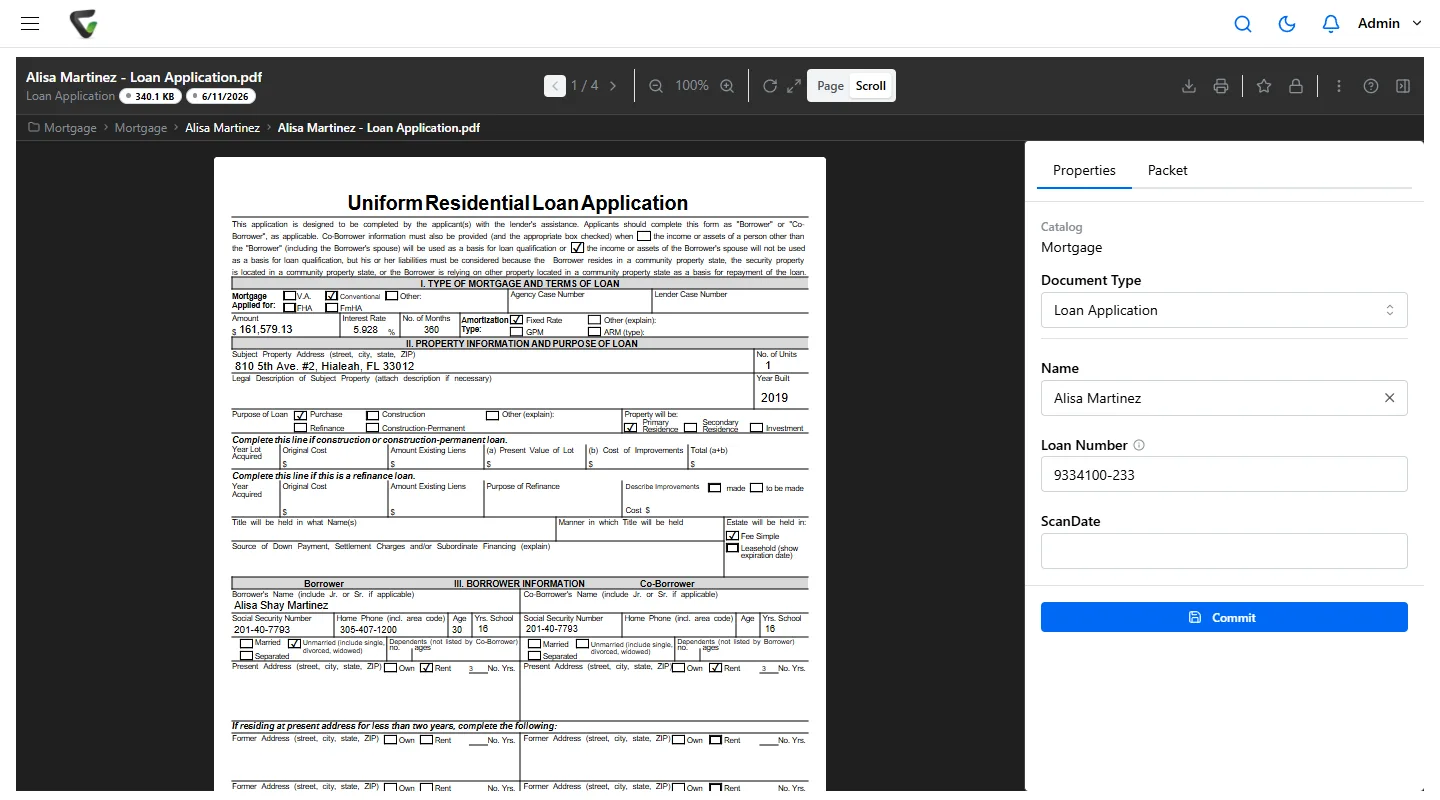
Set CapturePoint 6 up from a folder of your own loan files. It learns to tell loan applications from Loan Estimates, Closing Disclosures, pay statements, W-2s, verifications of employment, account statements and appraisals, and reads the loan number, borrower and lender where they are printed. For third-party documents that carry no loan number, scan the package behind a barcode cover sheet, or let it look the borrower up in an export of your pipeline.
Pages are read on the branch PC, not sent to an outside service. Each document goes to Content Central as a searchable PDF with its values, and joins the loan file on arrival. Every document someone confirms teaches it, so after steady use most packages need no review at all.
The exam pull
The request letter, answered line by line.
What a compliance officer typically has to produce for a lending review, and where each answer comes from in Content Central.
Loan files for the sampled loans
Search by loan number, several at once with OR. Each loan file opens with its Complete or Incomplete badge.
Power Search · Packet Search
The files as the examiner wants them
Merge each loan file into a single PDF, in the document order you set for the file.
Merge packet documents
A list of loans originated since the last exam
A saved search on the loan application type by date, exported to Excel.
Saved Searches · export to Excel
Proof of who can see customer files
Permissions by document type and by branch field. Files can ask for a reason before they open.
Field-value access · Require Reason for Access
Proof the schedule is followed
The Retention Policies page lists each document’s time remaining. Every deletion is in the audit trail, and every hold records who set it.
Retention Policies · Event Viewer
The rules on a loan file
One loan file, several clocks.
Regulation B asks you to keep consumer credit applications and related records for 25 months after you notify the applicant of the action taken. Regulation Z asks for the Closing Disclosure for five years after consummation and evidence of Loan Estimate compliance for three. The federal flood insurance rules ask you to keep the standard flood hazard determination form for as long as you own the loan.
In Content Central each document type carries its own retention period and destruction run, and a document whose clock starts at a later event can be set to its own period. Any document can be held past its date, and every override records who made it.
Customer information on every one of these documents falls under the Gramm-Leach-Bliley Act's safeguarding expectations: permissions by document type and branch, Active Directory or SAML sign-in, and MFA you can require for everyone.
Questions from lending and compliance
Our loan origination system already stores documents. Why another library?
Many banks keep the origination system for the loan and Content Central for the paper around it: the scanned package, post-closing documents, and the records the loan system does not hold, all on one retention schedule. Content Central can look up values from your systems through an ODBC connection, for example the borrower name from a loan number. Tell us what you run and we will show what fits in the demo.
What stops a document being filed to the wrong loan?
Nobody types it. CapturePoint 6 reads the loan number where it is printed, takes it from a barcode cover sheet or a lookup in your pipeline export where it is not, and can check it against that list. Anything it is unsure of, such as a borrower name that fits two loans, waits for a person with the reason shown.
Can each branch see only its own customers?
Yes. Access can be limited by a field value such as branch, so a branch manager sees only that branch’s files while loan operations and compliance see all of them.
How do we keep a loan file that is in litigation or a dispute?
Set its documents to Retain Indefinitely. That overrides their retention schedule until you remove it, and Content Central records who made the change.
Ademero has built document software since 2002 for more than 1,000 organizations. Fortune 500 companies and government agencies review its security every year.
Free live demo
Bring one loan package. We will take it from the branch scanner to the exam PDF.
Book a free demo and we will show you around, answer your questions and run your real paperwork through it. No cost, no pressure.
- A live tour of the products that fit your work
- Your own documents, set up and shown working
- Your workflow and process, mapped with you
- Straight answers from people who build it
