Manufacturing · quality documentation
Every NCR, CAPA and cert, one PO away.
Nonconformance reports, corrective actions, supplier certificates and inspection reports filed against the right supplier and PO, with every revision kept and every approval on record.
The audit is next week. Where is the CAPA?
Quality records live in binders, inboxes and shared drives across receiving, the floor and the quality office.
- 01
Certs in the receiving binder
Certificates of conformance arrive with the shipment and get filed wherever there is room.
- 02
NCRs with no trail
A nonconformance gets written up, but the CAPA and its follow-up live somewhere else.
- 03
The wrong revision on the floor
An old work instruction stays in use because nobody knew a new one was approved.
- 04
Traceability by walking around
Pulling every record for one PO or lot means visiting three departments and a filing cabinet.
The PO trace
Five desks file it. One number finds it.
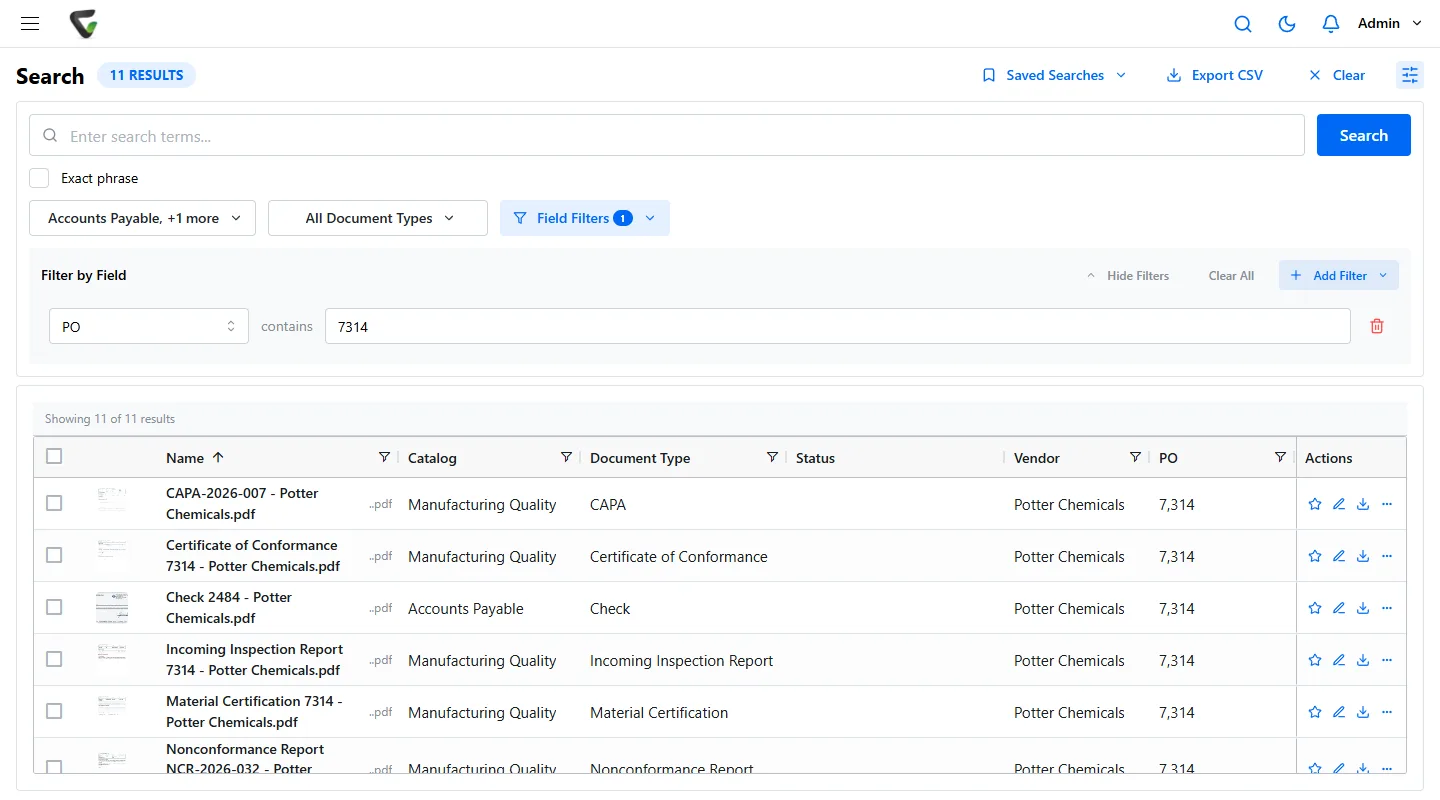
The purchase order number is the one thing every record about a purchased lot has in common. Make it a field that every quality and AP document type shares, and each desk files to it without knowing what the others filed.
Then the auditor's question, “show me everything for this PO,” is one field filter. The results span the Manufacturing Quality and Accounts Payable catalogs, and anyone without access to one of them simply does not see its rows.
Add part number and lot or heat number the same way, and the trace runs in any direction: from a lot to every PO it came in on, or from a supplier to every NCR written against them.
The records
Who files each record, how it gets in, and what it is found by.
Folders that build themselves.
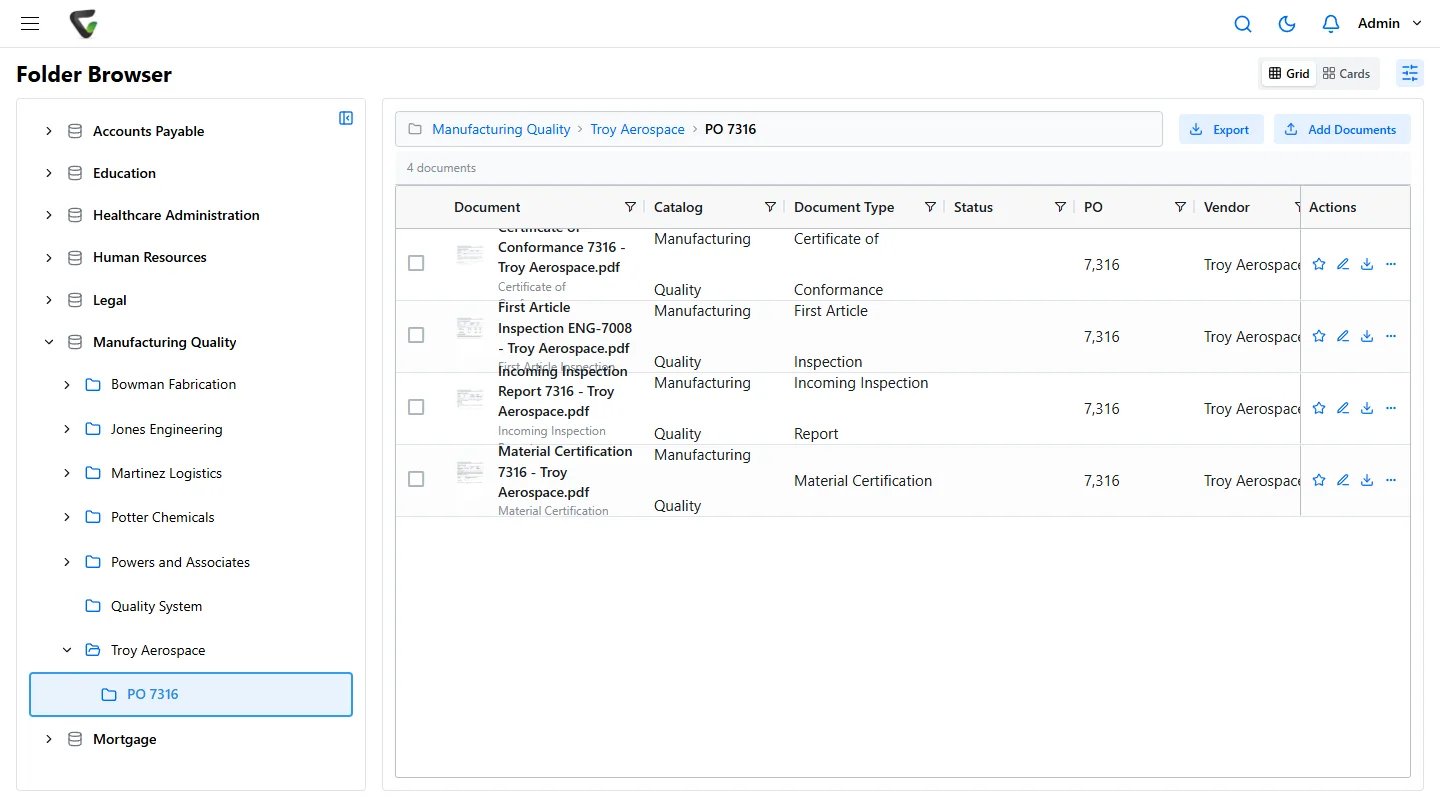
Folders and file names are built from the fields: catalog, then supplier, then PO. Nobody drags a scan into the right place, and if a supplier is renamed, the folders can be rebuilt.
At receiving, CapturePoint 6 splits the stack from the dock, tells the cert from the packing slip and reads the supplier and PO, on the receiving PC.
NCR to CAPA
The corrective action is filed beside the nonconformance.
- Every NCR carries its supplier, PO and part, and its CAPA carries the NCR number, so each opens the other.
- A workflow rule sees a new NCR arrive and emails the people who need to know, with the PO in the subject line.
- The CAPA goes through an approval process, quality engineer then quality manager, each confirming with a PIN, with notes passed along and a deadline that escalates.
- The supplier's response arrives by email and is captured from the quality mailbox into the same PO.
Approved revisions
Only approved revisions reach the floor.
Check a procedure out to change it, and route the change for review and approval before it goes back in. The approver's signature can be stamped on the page when they approve. Earlier revisions stay on file, and the audit trail shows who approved what and when.
Records are kept as long as your program says: a retention schedule per document type, and a per-document override for a customer or program that needs its records longer.
Document control for the whole plantAudit prep
A checklist for the surveillance audit, or the customer's.
Written for a quality team working to ISO 9001, AS9100 or IATF 16949. Print it, or copy it into your own audit plan.
Two weeks before
- Save a search for open CAPAs: document type CAPA and a status field that is not Closed. Chase the ones with no effectiveness check.
- Run the supplier certificate search by expiration date. A workflow rule can remind the buyer 30 days before any cert on file expires.
- Check that every procedure and work instruction in use is the latest approved version, and that superseded ones are out of the work areas.
The week before
- Pick three POs from the last audit period and search each one. Every NCR should have its CAPA, every lot its certs and inspection report.
- Open the Retention Policies page. Make sure nothing the auditor might sample is due for destruction, and hold anything that is.
- Export last quarter’s NCR list to Excel for the management review folder.
In the room
- The auditor names a PO. Type it into the PO field and hand over the result list.
- Asked who approved a change? Open the document’s version history: each change and approval step, with who and when.
- Asked for a record by a phrase on the page, like a heat number? Full-text search reads every scanned page.
Questions from quality managers
Does this support our ISO 9001 program?
ISO 9001 asks you to control documented information and keep records as evidence. Content Central does that work with approval workflows, version history, permissions, retention rules and a full audit trail, and the same controls serve programs built on ISO 9001 such as AS9100 and IATF 16949. Your registrar certifies your quality system; Content Central is where its records live.
Can we trace everything for one PO or lot?
Yes. Index NCRs, CAPAs, certificates, inspection reports and invoices by PO, supplier, part or lot. One search brings back every record that shares the number, across quality, receiving and accounts payable.
Do we have to scan everything ourselves?
Paper that arrives at receiving can be scanned on a CapturePoint 6 station, which splits, reads and names it. Documents that arrive by email or land in a watched folder are captured straight into Content Central.
How long does it take to get running?
Content Central goes live in 30 days. We set up your folders, index fields, workflows and retention rules with you, and CapturePoint 6 can start scanning the same day you install it.
Ademero has built document software since 2002 for more than 1,000 organizations. Fortune 500 companies and government agencies review its security every year.
Free live demo
Bring last month’s NCRs. We will trace them with you.
Book a free demo and we will show you around, answer your questions and run your real paperwork through it. No cost, no pressure.
- A live tour of the products that fit your work
- Your own documents, set up and shown working
- Your workflow and process, mapped with you
- Straight answers from people who build it
