Retail chains and distributors
The invoice says 48 cases. The dock signed for 46.
Ademero puts the purchase order, the packing slip, the signed receiving record and the supplier invoice in one file, read and named for you, so the person paying the bill sees what actually came off the truck. At every store and every dock.
The CapturePoint 6 free trial starts the first time you open it. No form.
Three desks touch every purchase order. They are rarely in the same building.
Store support center
AP lead and AP clerks
Match each supplier invoice to its PO and proof of receipt, chase the stores for the missing piece, answer vendors asking where their money is.
On their desk
- Supplier invoices
- Purchase orders
- Credit memos
- W-9s for new vendors
- Vendor statements
Distribution center or back of store
Receiving lead
Count the trailer, note shorts and damage on the delivery receipt, sign it, and get the paperwork somewhere AP can see it before the next truck backs in.
On their desk
- Packing slips
- Bills of lading
- Signed delivery receipts
- Return authorizations (RMAs)
Stores and districts
Store manager and district HR
Hire for the season, keep personnel files private and complete, and know where the lease and the landlord letters are when someone asks.
On their desk
- I-9s and W-4s
- Timecards
- Store leases and amendments
- Resale and exemption certificates
The paper trail behind one pallet.
What each document is, where it comes from and what your team needs off it. Give CapturePoint 6 a folder of your own samples and it sets the job up itself.
Purchase order
Your buyer or ERP
PO number, vendor, order and delivery dates, buyer, every line
Packing slip
In the carton
Order number, ship date, shipment ID, ship-to, cartons shipped
Bill of lading and delivery receipt
The carrier, signed at your dock
BOL and PRO numbers, pieces delivered, delivery condition, received by
Supplier invoice
Mail or the AP mailbox
Invoice number, vendor, PO, dates, subtotal, tax, total, every line item
Credit memo
The vendor, after a return or short ship
Credit memo number, the invoice it credits, reason, credit total
Form W-9
New vendor setup
Legal name, business name, tax classification, TIN
Certificate of insurance
Vendors and contractors on site
Certificate number and date, insured, producer
Return authorization (RMA)
The vendor, before you ship back
RMA number, items, quantities, the original invoice
Vendor agreement
Merchandising and legal
Payment terms, allowances, deduction and chargeback terms, renewal date
Store lease
Real estate
Store number, landlord, term, renewal notice date, CAM terms
Where retail paperwork costs real money.
None of these need a bad employee. They need one piece of paper in the wrong building on the wrong day.
- 01
Paid in full for a short shipment.
Receiving wrote "46 of 48" on the delivery receipt and put it in the tray. The invoice reached AP first, matched the PO, and was paid. The 2 missing cases turn up months later in a vendor reconciliation, if at all.
- 02
The return shipped. The credit never landed.
The store boxed up the damaged goods under an RMA. Weeks later the credit memo arrives with a number nobody recognizes, and it sits unapplied because no one can tie it back to the original invoice.
- 03
The vendor disputes your deduction.
You short-paid for a late, mislabeled delivery. The vendor pushes back and asks for proof. The signed delivery receipt is in a back room at store 112, in a box with three months of others.
- 04
The renewal window closed in a drawer.
The lease for a strong store needed written notice to renew by a set date. The only copy was in the store manager’s office, and the date went by.
Follow the paper: dock, inbox, approval.
At the dock and in the store office
CapturePoint 6 reads the stack before the next truck.
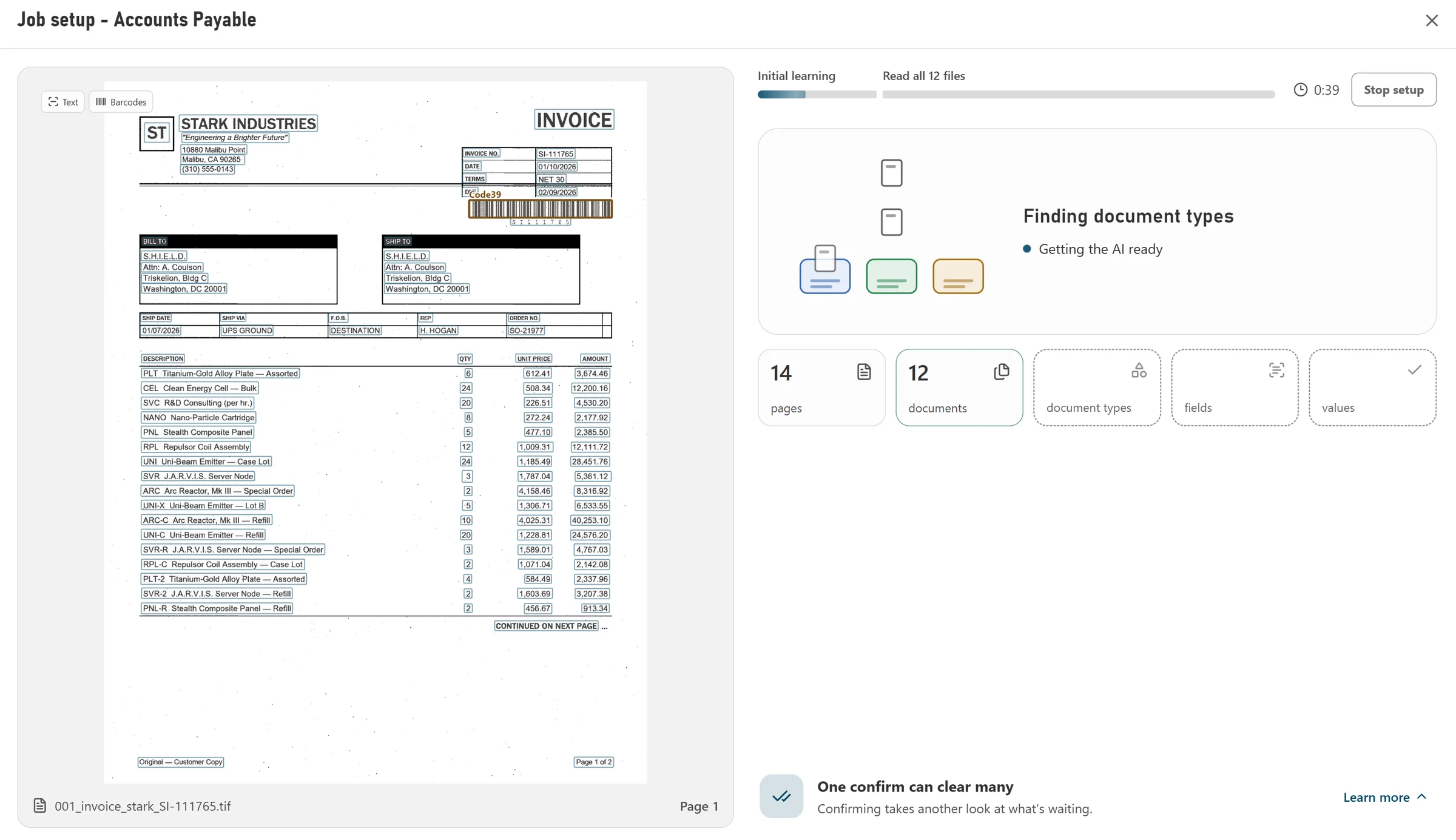
Put it on the receiving PC with any TWAIN scanner. Drop in a mixed stack of packing slips, delivery receipts and invoices and it splits them into documents, works out what each one is, reads the numbers that matter and names every file. It checks the line-item math too, so a line that does not add up is flagged before anyone keys it.
- Reads and extracts on that PC, so nothing waits on an upload
- Unlimited scanning at each station, no per-page fees
- Learns from every correction; after steady use most documents need no review
- Sends files to Content Central, shared folders, SharePoint or OneDrive, Google Drive or Dropbox
In the AP inbox
Emailed invoices, read without anyone opening them.
Content Central watches your AP mailbox in Microsoft 365, Gmail or any IMAP server and files each invoice attachment as it arrives, so no invoice lives in one person's inbox. Anything still missing a PO number waits in one queue for a person to fill it in.
For distributors that want the data, not the PDF: send supplier invoices to Paige and get the header fields and every line item back as clean data, delivered by download, SFTP or webhook for your ERP to pick up. It learns a vendor's layout from a few samples.
At the store support center
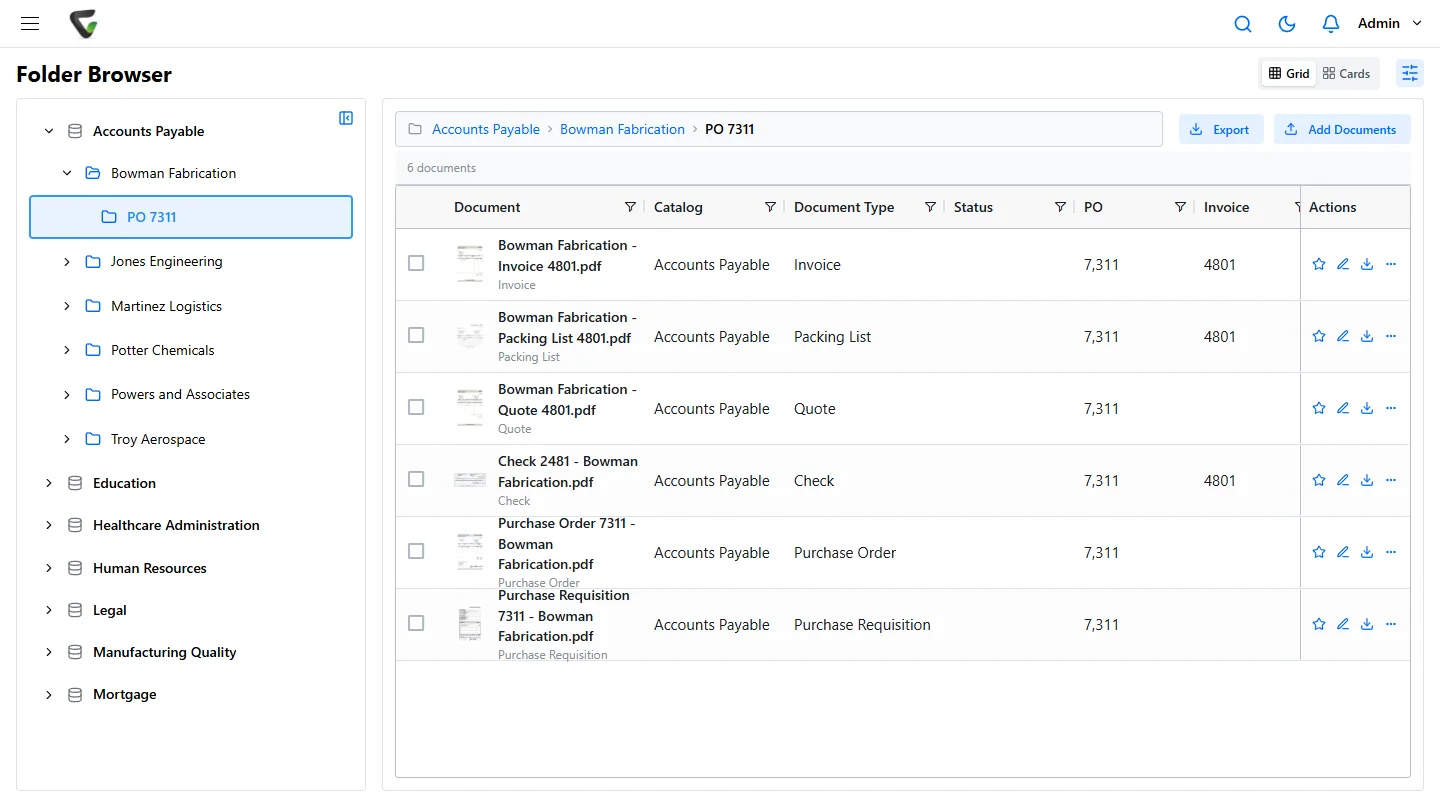
Content Central keeps the whole PO in one place and routes it.
- A vendor packet per PO. Mark the documents a PO needs. Each one joins the packet when it is filed with that PO number, and the packet shows Complete or what is still missing. An Incomplete Packets report lists every PO still waiting on a receiving record.
- Approvals that route themselves. Start an approval when an invoice arrives, send anything over your limit to a second approver, and escalate what has waited too long.
- Each store sees its own files. Limit access by a field such as store number, so store 112 sees store 112 and the support center sees every store.
- Straight into accounting. Approved bills export to QuickBooks Online or Desktop, Sage 50, Sage X3, Workday or Epicor, with vendor details looked up from your ERP over ODBC.
Worked example
One short shipment, start to finish.
PO 7311, 48 cases ordered. Here is who touches it and what they see. People still make the calls; they just stop hunting for paper.
Tuesday 6:40 am
Receiving lead, DC dock 3
Counts PO 7311: 46 cases of 48. Notes the short on the delivery receipt, signs it and drops the packing slip, receipt and BOL in the scanner.
Tuesday 6:44 am
CapturePoint 6, on the dock PC
Splits the stack into three documents, reads the PO number, BOL and PRO numbers and pieces delivered, names each file and sends them to Content Central.
Wednesday 9:12 am
AP scanning station, support center
Invoice 20817 arrives in the mail, billing 48 cases. CapturePoint 6 reads the vendor, invoice number, PO and total, and the invoice joins the PO 7311 file next to the dock paperwork.
Wednesday 10:05 am
AP clerk
Opens the approval, sees the receiving record next to the invoice, short-pays to 46 cases and adds a note asking the vendor for a credit memo.
Following Monday
Vendor
Sends the credit memo for 2 cases. CapturePoint 6 reads the invoice number it credits, the clerk confirms PO 7311, and the file is complete.
Same day
Controller
Approves the adjusted bill. Content Central exports it to your accounting system and keeps the whole trail: PO, dock count, invoice, credit, approvals.
What to keep, and the rule behind it.
The common US starting points for a multi-store retailer. Confirm the periods with your accountant and counsel, then set each one once in Content Central as a retention schedule for that document type.
- Form I-9, every store hire
- Federal immigration law (USCIS)
- At least 3 years after the hire date, or 1 year after employment ends, whichever is later.
- Payroll records and timecards
- Fair Labor Standards Act recordkeeping
- Payroll records at least 3 years; timecards and the records wages were figured from at least 2 years.
- Resale and exemption certificates
- Your state sales tax rules
- As long as your state can audit the sales they cover. The window differs by state, so set it per state.
- Supplier invoices, POs, credit memos
- IRS record rules and your auditors
- As long as they support a tax return, usually at least 3 years after filing. Many finance teams choose 7.
- Store leases and vendor agreements
- Contract terms and your counsel
- For the term, then through your state’s limit for contract claims.
- Anything in a dispute or audit
- Legal hold
- Until counsel releases it, whatever the schedule says.
Content Central lists every document with the time it has left, shows the ones due for removal, and lets an authorized person mark any document Retain Indefinitely for a legal hold, with who did it written to the record. Start from our records retention policy template.
Start where the paper piles up.
At a dock or a store
Scan a real stack this afternoon.
Install CapturePoint 6 on a Windows 10 or 11 PC, take the 2-minute tour, then run yesterday's receiving paperwork through it.
At the support center
See your PO process set up live.
Bring a PO, its packing slip, receiving record and invoice. We will build the vendor packet and the approval route with you on a free demo.
Guides
Templates
Related
Ademero has made document software since 2002 for more than 1,000 organizations. Fortune 500 companies and government agencies review our security every year and keep renewing.