Accounts Payable
Invoice processing best practices: a checklist from intake to export
Six stages every invoice goes through, what to decide at each one, the checks that catch duplicates and fraud, and a plan for the exceptions that eat most of an AP team's week.
Ademero Team9 min read

Invoice processing rarely breaks on the hard calls. It breaks on handling: an invoice sent to the wrong person, a total typed with two digits swapped, an approval sitting in someone's inbox, a duplicate that nobody noticed because it came by mail and by email. This checklist walks an invoice through six stages and lists what to decide at each one. It is written for AP leads, controllers and office managers, and works whether you use software or not.
1. Intake: every invoice through one door
An invoice that reaches AP late is an invoice paid late, or paid twice. Make every invoice arrive the same way.
- One AP email address for all vendors, monitored by AP, not by individuals. Tell vendors once, and put it on every purchase order.
- Invoices go to AP, not to the person who ordered. Approvers approve; they should not be where invoices start their life.
- Record the date received for every invoice, paper or email. It drives aging and any early-payment terms.
- Ask vendors for a PO number and one invoice per PDF. Most will, if asked, and it removes a whole class of exceptions.
- Separate what is not an invoice: statements, quotes, remittance copies and marketing mail. Statements are for reconciliation, not for payment.
- Empty every channel daily, with a named backup for when the owner is out.
2. Capture: turn the invoice into checked data
Capture means a clean PDF of each invoice plus the values you post. Decide these once and write them down:
| Decision | Good default |
|---|---|
| Header fields to capture | Vendor, invoice number, invoice date, due date, PO number, subtotal, tax, total |
| Required fields | Vendor, invoice number, invoice date and total; a missing one always stops the invoice |
| Line items | Only if you match to POs line by line or code lines to different GL accounts |
| File format | One searchable PDF per invoice, named from its values |
| Who reviews uncertain values | One named AP clerk, every working day, with a backup |
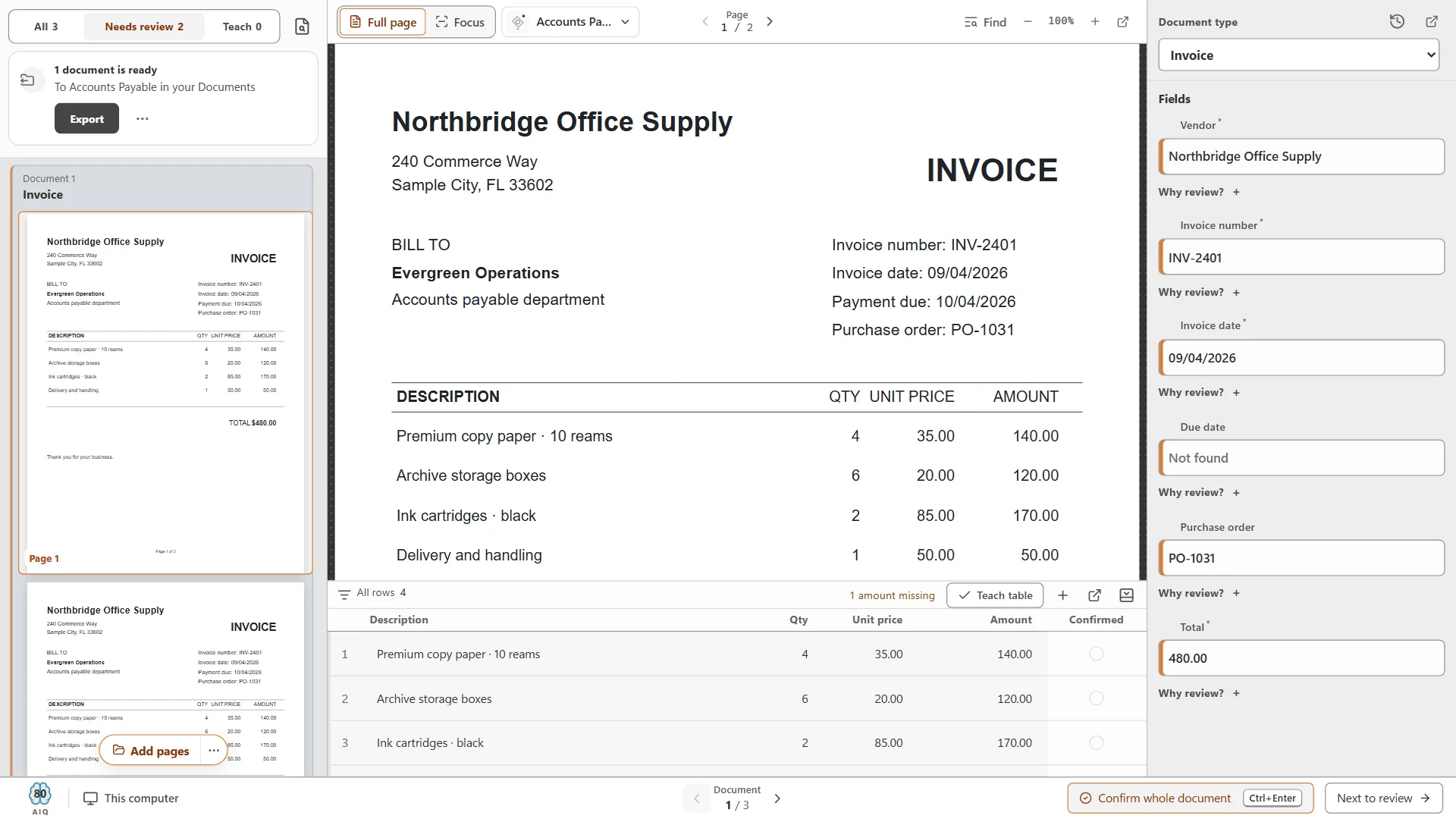
Whatever tool you use, judge it on your own invoices: count values that were right without review, values flagged for review, and values that were wrong but not flagged. The last number is the one that costs money. The invoice OCR guide shows how to run that test in an afternoon.
3. Validation: the checks before anyone approves
Approvers should decide whether the business owes the money, not proofread data. Run these checks before an invoice reaches them, and send anything that fails to exceptions:
- Vendor is on the vendor list. Check against your vendor master, not just the name on the page. A new vendor goes through onboarding (including a W-9) before its first invoice is paid.
- Not a duplicate. Same vendor and invoice number, or same vendor, amount and date. Normalize the number first: INV-2401, INV 2401 and 2401 are the same invoice.
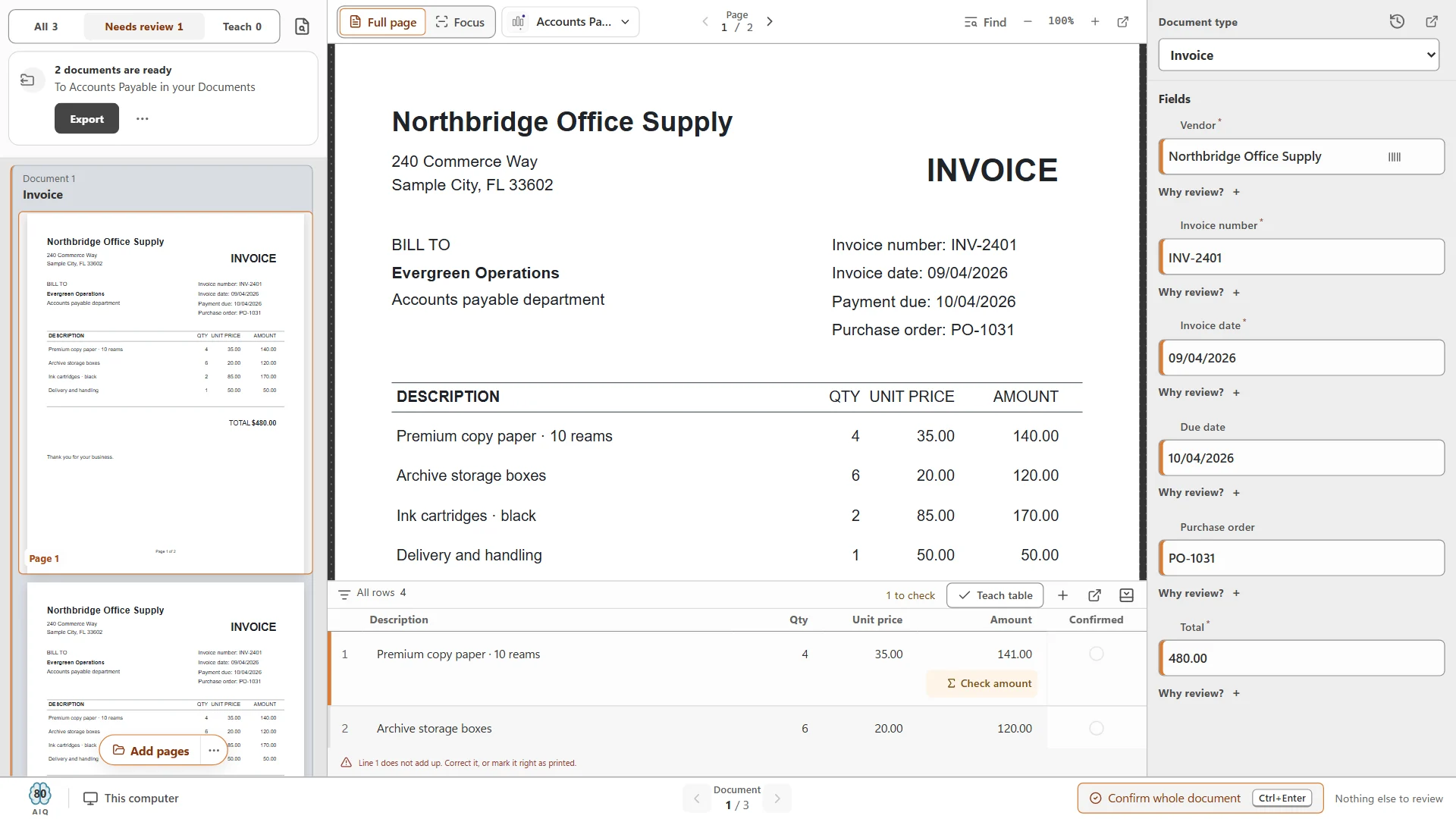
- The math adds up. Each line's quantity times unit price equals its amount; the lines plus tax and freight equal the total.
- It matches what was ordered. PO number exists, is open, and the quantities and prices are within your tolerance.
- Dates make sense. Not dated in the future, not months old without explanation, in the right posting period.
- Payment details have not changed. A new remit-to address or bank account on an invoice is the classic fraud signal. Confirm any change by phone with a contact you already have on file, never with the details on the invoice or in the email.
4. Approval: the right person, once, on the record
- 01
Write an approval matrix
Who approves what, by department and amount. For example: department head up to a set limit, plus the controller above it. Keep it to one page and review it when people change roles. - 02
Send the approver everything in one place
The invoice PDF, the captured values, the PO and the proposed GL coding. An approver who has to ask for the PO will put the invoice aside. - 03
Set a deadline and an escalation
For example, a reminder after two working days and the approver’s manager after a few more. Decide what happens when someone is on vacation: a named substitute, not a forwarded email. - 04
Separate the duties
The person who adds or changes vendors should not also approve that vendor’s invoices or release payments. In a small office where one person must do both, have someone else review vendor changes monthly. - 05
Keep the approval with the invoice
Who approved, when and with which note should live with the document, not in an email thread. That is what an auditor asks for.
5. Export and filing: post what was approved, not what was retyped
- Post from the approved data. Import or export it into the accounting system. Retyping at this stage undoes the work of every check above.
- Mark it posted. Each invoice should carry a status (approved, posted, paid) so nothing is posted twice or left behind.
- File the PDF where people look. One place, named the same way every time, for example Invoice › Vendor › YYYY-MM-DD_Invoice number.pdf, with its approval history attached or linked.
- Keep records for your retention period. Ask your accountant how long invoices must be kept; our retention schedules are a starting point. Consider PDF/A for invoices kept for years (see searchable PDF vs PDF/A).
6. Exceptions: decide in advance who does what
Exceptions are where AP time goes. The fix is not fewer exceptions on day one; it is knowing, for each kind, who owns it and what they do, so nothing sits in a pile.
| Exception | Owner | What to do |
|---|---|---|
| No PO number | AP clerk | Look up by vendor and amount; if none exists, send to the requester to raise one or approve as non-PO spend |
| Price or quantity differs from PO | Buyer or requester | Confirm with the vendor; approve the difference or request a corrected invoice or credit memo |
| Vendor not on the list | Vendor master owner | Onboard the vendor (W-9, payment details verified by phone) before processing |
| Possible duplicate | AP lead | Compare the two documents; void the copy and note why |
| Remit-to or bank details changed | AP lead or controller | Verify by phone with a known contact before any payment |
| Credit memo | AP clerk | Link it to the original invoice and apply it; do not file it as a payable |
| Statement received | AP clerk | Reconcile against open invoices; request copies of anything missing |
| Unreadable or incomplete scan | Whoever scanned it | Rescan from the original while it is still in the batch box |
| Disputed invoice | Requester and AP lead | Put on hold with a note and a follow-up date, and tell the vendor in writing |
Weekly and month-end checks
- Weekly: invoices waiting for approval, oldest first; the exceptions list and how long each has been open; anything received but not yet captured.
- Month-end: cutoff (invoices received this month are in this month), statements reconciled for your largest vendors, and a review of every vendor-master change made during the month.
- Quarterly: the approval matrix still matches the organization chart; vendors with no activity are made inactive.
The one-page version
Print this and tick it off when you set the process up:
- 01
Intake
One AP address, invoices to AP only, date received recorded, statements and non-invoices separated, channels emptied daily. - 02
Capture
Fields and required fields agreed, line items only if used, one searchable PDF per invoice, a named reviewer. - 03
Validation
Vendor on the list, duplicate check, math check, PO match, sensible dates, payment-detail changes verified by phone. - 04
Approval
A written matrix, everything in one place for the approver, deadlines with escalation and substitutes, duties separated, approval kept with the invoice. - 05
Export and filing
Post from approved data, status on every invoice, one filing place and naming pattern, retention period known. - 06
Exceptions
An owner and an action for each kind; reviewed weekly with the approval backlog; vendor changes reviewed monthly.
Where software helps
Most of the checklist is decisions, and no software makes them for you. Software takes away the handling: the typing, the forwarding, the filing and the hunting. Here is where our products fit, and where they do not.
- CapturePoint 6 handles intake and capture on a Windows PC: it scans or imports invoices, splits the stack and recognizes each document type (its 2-minute tour shows it on an invoice, a purchase order, a credit memo, a W-9 and an expense report), reads header fields and line items locally, checks line-item math, can check values against your own lists such as your vendor list, and shows why anything waits. It names and files each invoice from its own values.
- Content Central handles approval and export, in the cloud or on your own servers: approval processes started by a workflow rule (for example by amount), deadlines and escalation, substitutes, approve from email, sign on approval, vendor lookups from your accounting database, and export of approved bills to QuickBooks Online, QuickBooks Desktop and Sage 50, or records to Workday and Epicor, with duplicate detection. See approval workflows.
- Paige is the cloud option when invoices only arrive as files: send them in and get fields and line items back by download, SFTP or webhook.
None of these is a payments system: payments and matching stay in your accounting system. The invoice processing solution page shows how the pieces fit together, and the CapturePoint 6 free trial includes a 2-minute tour on sample accounts payable documents.
Get the next guide by email
Practical notes on documents, capture and automation. No spam, unsubscribe any time.
CapturePoint 6
Scan the stack. It splits, sorts, reads and names every document.
Cutting-edge local AI on your own Windows PC. Finished documents go to your folders, Content Central, Nucleus One, SharePoint, OneDrive, Google Drive or Dropbox. The free trial starts the first time you open it, no form to fill in.