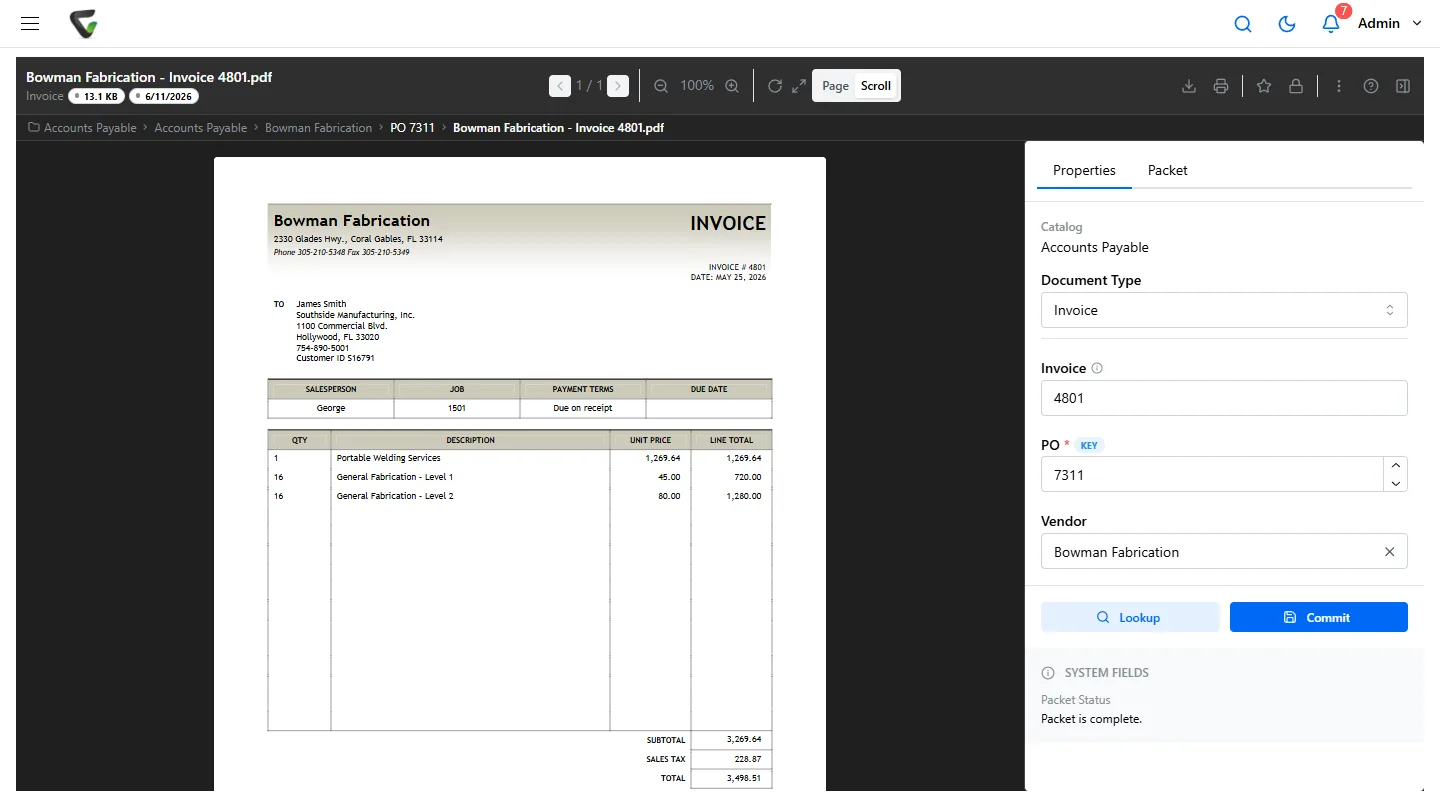
Metadata Management Best Practices: Organize, Find, and Control Your Documents
Transform your document repository into an intelligent information system. Learn how to design, implement, and maintain metadata strategies that improve discoverability and compliance.
Sarah Chen
Information Architecture Director
Metadata is the backbone of modern document management, turning chaotic file systems into organized, searchable, and intelligent information repositories. Organizations with effective metadata strategies see 75% faster document retrieval and 60% improvement in compliance readiness. This comprehensive guide will show you how to design, implement, and maintain a metadata management system that transforms how your organization handles information.
Understanding Document Metadata
Document metadata is structured information that describes, explains, locates, or makes it easier to retrieve, use, or manage documents. Think of metadata as the card catalog system for your digital documents—it provides the essential information needed to find, organize, and manage content effectively.
Key Principle:
Good metadata turns documents from isolated files into connected, discoverable, and actionable business assets. The goal is to capture just enough metadata to support business processes without creating administrative burden.
Types of Document Metadata
1. Descriptive Metadata
Information that describes the content and context of the document:
- Title: Clear, descriptive document name
- Author: Document creator or responsible party
- Subject/Description: Brief summary of content
- Keywords/Tags: Searchable terms and categories
- Language: Primary language of the document
- Abstract: Longer summary for complex documents
2. Administrative Metadata
Information about document management and technical details:
- Creation Date: When the document was created
- Modification Date: Last update timestamp
- File Format: Document type (PDF, DOCX, etc.)
- File Size: Storage space requirements
- Version Number: Document version tracking
- Security Classification: Access control level
3. Structural Metadata
Information about document organization and relationships:
- Department: Organizational unit responsible
- Document Type: Category or template used
- Project/Case ID: Related business process
- Parent/Child Relationships: Document hierarchies
- Workflow Status: Approval or review stage
- Retention Schedule: Lifecycle management rules
4. Business-Specific Metadata
Custom fields relevant to your industry or processes:
- Customer/Client ID: Associated business entity
- Contract Number: Legal document references
- Product Line: Related business area
- Compliance Category: Regulatory requirements
- Geographic Location: Physical or service area
- Priority Level: Business importance ranking
Metadata Strategy Development
Step 1: Assess Current State
Before implementing new metadata standards, understand your current situation:
Current State Analysis Checklist
Document Inventory
- • Total number of documents
- • File types and formats
- • Storage locations
- • Age and update frequency
User Behavior
- • How users currently search
- • Common naming conventions
- • Folder organization patterns
- • Pain points and frustrations
Business Requirements
- • Compliance obligations
- • Retention requirements
- • Workflow dependencies
- • Integration needs
Technical Environment
- • Existing systems and tools
- • Integration capabilities
- • User skill levels
- • Performance requirements
Step 2: Define Metadata Schema
Create a structured framework that balances completeness with usability:
| Field Name | Type | Required | Controlled Vocabulary | Source |
|---|---|---|---|---|
| Document Title | Text | Yes | No | User Input |
| Document Type | Dropdown | Yes | Yes | Template/System |
| Department | Dropdown | Yes | Yes | User Profile/Directory |
| Creation Date | Date | Yes | No | System Generated |
| Keywords | Multi-select | No | Suggested | Auto + User |
| Retention Period | Dropdown | Yes | Yes | Policy Rules |
Step 3: Create Controlled Vocabularies
Standardized terminology ensures consistency and improves search effectiveness:
Document Types Taxonomy
- • Contracts & Agreements
- - Service Agreements
- - Purchase Contracts
- - Employment Contracts
- • Financial Documents
- - Invoices
- - Purchase Orders
- - Expense Reports
- • Policies & Procedures
- - HR Policies
- - Safety Procedures
- - IT Guidelines
Keywords & Tags
- • Functional Areas
- - Finance, HR, Legal, IT
- • Process Types
- - Approval, Review, Draft
- • Content Themes
- - Training, Compliance, Operations
- • Geographic Scope
- - Global, Regional, Local
- • Audience
- - Internal, External, Public
Implementation Best Practices
1. Start Simple and Evolve
Begin with essential metadata fields and gradually add complexity:
Phased Implementation Approach
Phase 1: Foundation (Months 1-2)
- • Title, Author, Date, Document Type
- • Department/Business Unit
- • Basic security classification
Phase 2: Enhancement (Months 3-4)
- • Keywords and tags
- • Project/case associations
- • Retention categories
Phase 3: Advanced (Months 5-6)
- • Workflow status tracking
- • Custom business fields
- • Relationship mapping
2. Automate Metadata Capture
Reduce user burden and improve consistency through automation:
| Automation Method | Metadata Fields | Benefits |
|---|---|---|
| File Properties | Creation date, file size, format | 100% accuracy, no user effort |
| User Directory | Author name, department | Consistent, up-to-date |
| Email Integration | Recipients, subject, timestamp | Captures communication context |
| Document Templates | Document type, category | Pre-populated, standardized |
| AI/OCR Analysis | Content keywords, entities | Rich, automated tagging |
| Workflow Context | Process stage, approval status | Business process tracking |
3. Design User-Friendly Interfaces
Make metadata entry as painless as possible:
✅ Do This
- • Use dropdown menus for controlled vocabularies
- • Provide auto-complete suggestions
- • Pre-populate fields when possible
- • Use clear, intuitive field labels
- • Group related fields logically
- • Show only essential fields initially
- • Provide contextual help
❌ Avoid This
- • Long forms with too many fields
- • Free-text fields for standardized data
- • Technical jargon in field names
- • Requiring metadata for every upload
- • Complex nested classifications
- • Validation rules that are too strict
- • No guidance or examples
Metadata Standards and Compliance
Industry Standards
Leverage established standards for interoperability and best practices:
Dublin Core Metadata Initiative
15 basic elements for describing digital resources: Title, Creator, Subject, Description, Publisher, Contributor, Date, Type, Format, Identifier, Source, Language, Relation, Coverage, Rights.
Best for: General document collections, interoperability
ISO 15489 Records Management
International standard for records management including metadata requirements for maintaining authentic, reliable, and usable records over time.
Best for: Regulated industries, long-term retention
PREMIS Preservation Metadata
Data dictionary for preservation metadata supporting digital preservation activities and ensuring long-term access to digital resources.
Best for: Long-term digital preservation, archives
Regulatory Compliance
Ensure your metadata strategy supports compliance requirements:
| Regulation | Key Metadata Requirements | Retention Implications |
|---|---|---|
| GDPR | Data subject, processing purpose, consent basis | Right to erasure tracking |
| SOX | Financial period, control attestation, reviewer | 7-year minimum retention |
| HIPAA | Patient ID, PHI classification, access log | 6-year minimum retention |
| FDA 21 CFR Part 11 | Digital signature, audit trail, validation status | Complete lifecycle tracking |
Search Optimization Strategies
1. Multi-Faceted Search
Enable users to search and filter using multiple metadata dimensions:
Search Interface Design
Quick Search
- • Full-text content search
- • Title and description search
- • Tag and keyword matching
- • Auto-complete suggestions
Advanced Filters
- • Document type selection
- • Date range filtering
- • Department/author filtering
- • File format restrictions
2. Semantic Search Enhancement
Use controlled vocabularies and relationships to improve search relevance:
- Synonyms: Map related terms (contract = agreement = accord)
- Hierarchies: Search parent terms includes children
- Related Terms: Suggest alternative search terms
- Stemming: Match word variations (manage, managing, manager)
3. Search Analytics
Monitor search behavior to improve metadata and discoverability:
Successful Search Rate
Average Queries per Session
Average Time to Find
Governance and Maintenance
1. Establish Governance Framework
Create clear ownership and decision-making processes:
Governance Structure
Metadata Steering Committee
- • Executive sponsor
- • Department representatives
- • IT/Systems lead
- • Records manager
- • Compliance officer
Data Stewards
- • Subject matter experts
- • Vocabulary maintenance
- • Quality assurance
- • User training
- • Issue resolution
Technical Team
- • System configuration
- • Integration development
- • Performance monitoring
- • Backup and security
- • User support
2. Quality Assurance Processes
Maintain metadata quality through regular review and validation:
| Quality Check | Frequency | Responsibility | Action |
|---|---|---|---|
| Completeness review | Weekly | Data stewards | Identify missing metadata |
| Consistency audit | Monthly | System admin | Standardize variations |
| Vocabulary review | Quarterly | Steering committee | Update controlled terms |
| Usage analysis | Quarterly | Business analysts | Optimize for user needs |
3. Continuous Improvement
Evolve your metadata strategy based on usage patterns and business needs:
- User Feedback: Regular surveys and focus groups
- Search Analytics: Monitor query patterns and success rates
- Business Evolution: Adapt to organizational changes
- Technology Updates: Leverage new capabilities and standards
- Compliance Changes: Respond to regulatory updates
Technology Implementation
1. Platform Capabilities
Ensure your document management system supports comprehensive metadata management:
Essential Features
- • Custom metadata fields
- • Controlled vocabularies
- • Automated metadata capture
- • Bulk metadata editing
- • Metadata validation rules
- • Import/export capabilities
- • API access for integration
Advanced Capabilities
- • AI-powered auto-tagging
- • Machine learning classification
- • Semantic search
- • Metadata inheritance
- • Workflow integration
- • Analytics and reporting
- • Multi-language support
2. Integration Strategies
Connect metadata across your technology ecosystem:
ERP Integration
Sync vendor information, project codes, and financial data to enrich document metadata automatically. Enable cross-system reporting and analysis.
CRM Integration
Connect customer documents with account information, contact details, and interaction history for complete customer view.
Directory Services
Leverage Active Directory or LDAP for automatic author information, department assignments, and security classifications.
Measuring Success
Key Performance Indicators
Track these metrics to measure metadata management effectiveness:
Metadata Completeness
Target: >90%
Average Search Time
Target: <15s
Search Success Rate
Target: >95%
User Satisfaction
Target: >4.0/5.0
ROI Calculation
Quantify the business value of effective metadata management:
Typical Benefits
Time Savings
- • 75% faster document retrieval
- • 60% reduction in duplicate work
- • 50% faster compliance reporting
- • 40% less time organizing files
Cost Reductions
- • Lower storage costs through deduplication
- • Reduced compliance penalties
- • Fewer lost document incidents
- • Decreased training requirements
Common Challenges and Solutions
Challenge: User Resistance
Users find metadata entry burdensome and skip required fields.
Solution: Maximize automation, minimize required fields, and demonstrate clear benefits through quick wins and success stories.
Challenge: Inconsistent Data
Different users enter the same information in various formats.
Solution: Implement controlled vocabularies, provide clear guidelines, and use validation rules to enforce consistency.
Challenge: System Limitations
Legacy systems don't support modern metadata requirements.
Solution: Consider middleware solutions, API integrations, or migration to modern platforms with robust metadata capabilities.
Challenge: Maintenance Overhead
Keeping vocabularies current and metadata clean requires significant effort.
Solution: Establish clear governance roles, implement automated quality checks, and regularly review and optimize metadata schemas.
Future Trends
AI and Machine Learning
Emerging technologies are transforming metadata management:
- Auto-Classification: AI categorizes documents based on content analysis
- Entity Extraction: Automatically identify people, places, dates, and concepts
- Sentiment Analysis: Understand document tone and urgency
- Relationship Discovery: Map connections between documents and data
- Predictive Tagging: Suggest metadata based on similar documents
Linked Data and Knowledge Graphs
Creating richer, more connected information architectures:
- Semantic Relationships: Connect documents through meaningful relationships
- Cross-System Integration: Link metadata across disparate systems
- Enhanced Discovery: Find related content through network traversal
- Business Intelligence: Generate insights from document relationships
Conclusion
Effective metadata management transforms document repositories from digital file cabinets into intelligent information assets. By following the strategies and best practices outlined in this guide, organizations can achieve dramatic improvements in document discoverability, process efficiency, and compliance readiness.
Remember that metadata management is not a one-time project but an ongoing capability that evolves with your business. Start with a solid foundation, automate where possible, engage users throughout the process, and continuously optimize based on usage patterns and feedback.
Success Factor:
The most successful metadata implementations balance business requirements with user experience, leveraging automation to reduce burden while maintaining quality and consistency.
Ready to Optimize Your Metadata Strategy?
Our document management specialists can help you design and implement a metadata strategy that transforms how your organization finds, manages, and uses information.
Schedule a Metadata ConsultationReady to Start Your Digital Transformation?
See how Ademero can help you modernize your business processes and achieve your digital goals.