Developer guide · Paige
Document data extraction API: documents in, clean JSON out
How to send invoices, forms and statements to Paige from your own systems and get back typed documents, fields and line items as JSON: what goes in, what comes out, how delivery works, and what to do when something fails.
For developers wiring documents into an ERP, a database or a workflow, and the operations lead who has to trust the data that arrives.
Most teams that go looking for a document extraction API want the same thing: a file goes in from a mailbox, a portal or another system, and structured data comes out in a form their code can trust. The hard parts are rarely the HTTP calls. They are teaching the service your documents, knowing when a value is unsure, and handling the day your endpoint is down.
This guide walks through all of it using Paige, Ademero's cloud document AI, with real field names from its API. Where a desktop tool would serve you better, it says so.
The shape of the job
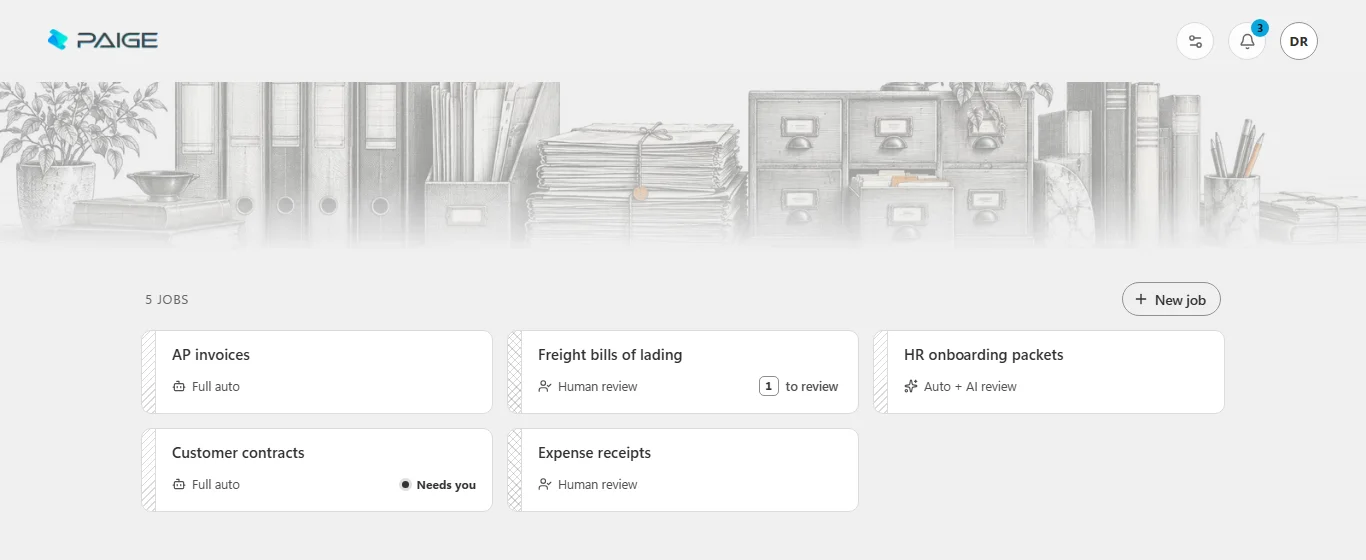
Paige organizes work into jobs. A job is one stream of documents, such as your accounts payable mail or your freight paperwork. Each job has its own setup (document types, fields, tables, file naming), its own email address, and its own destinations. Everything below happens per job.
Getting documents in
Paige takes documents four ways, and you can mix them within one job:
API
- How it works:
- POST files as a batch to the job, with an API key a company admin creates and can revoke.
- Good for:
- Portals, ERPs and anything that already holds the file.
- How it works:
- Every job has its own address. PDF, TIFF, PNG and JPEG attachments become pages, including files inside forwarded emails and ZIPs.
- Good for:
- Vendors and branches that already email documents.
Paige Scan
- How it works:
- A small Windows app that scans into a job, or watches a folder (one per job) and sends each file once it is complete.
- Good for:
- Scanners, copiers that save to a share, legacy exports.
Upload
- How it works:
- Drag files or whole folders into the job in the browser.
- Good for:
- Samples, backlogs and one-off batches.
| Way in | How it works | Good for |
|---|---|---|
| API | POST files as a batch to the job, with an API key a company admin creates and can revoke. | Portals, ERPs and anything that already holds the file. |
| Every job has its own address. PDF, TIFF, PNG and JPEG attachments become pages, including files inside forwarded emails and ZIPs. | Vendors and branches that already email documents. | |
| Paige Scan | A small Windows app that scans into a job, or watches a folder (one per job) and sends each file once it is complete. | Scanners, copiers that save to a share, legacy exports. |
| Upload | Drag files or whole folders into the job in the browser. | Samples, backlogs and one-off batches. |
Sending files through the API
A batch is one upload of one or more files. Paige splits the files into pages and documents and reads them. Files can be PDF, TIFF, PNG or JPEG, up to 10 MB each and about 28 MB per request; send larger sets as several batches. Every call that creates something carries an Idempotency-Key of your own, so a retry after a timeout never creates the batch twice.
curl <paige>/v1/batches \
  -H "Authorization: Bearer $PAIGE_API_KEY" \
  -H "Idempotency-Key: $(uuidgen)" \
  -F "job=<job id>" \
  -F "files=@bowman-4801.pdf" -F "files=@march-statements.tif"

201 Created
{"id": "<batch id>", "state": "processing", "pageCount": 4, "documentIds": [], ...}
A file Paige cannot read costs that file and nothing else: the rest of the batch goes in, and the skipped file is named with the reason. The API reference, quickstart programs in curl, Python, C# and JavaScript, and an OpenAPI document for generating a typed client are in the app under Developers.
Teaching a job from samples
There are no templates to draw. You open the job in the Paige web app and give it real documents: a folder of last month's invoices, a stack of bills of lading. Paige reads them and proposes the document types it found, the fields for each type and any tables. You confirm or correct the proposal, and the job reads that way from then on, whichever way documents arrive.
- Use real, varied samples. Your biggest senders, a few one-offs, a faint scan and a long multi-page document teach more than twenty copies of one clean layout.
- Name fields for your system. The field names you settle on are the names in the JSON, so pick the ones your integration expects.
- Corrections teach. When a person fixes a value in review, the job learns from it. A document corrected after it was delivered goes out again as a new revision.
What comes back
One upload can hold many documents. A batch's documentIds lists the documents Paige split it into, and each document has:
- A type, from the job's setup (
invoice,bill_of_ladingand so on). - Its pages, each with the file and page number it came from, so you can trace a document back to the upload.
- Fields, each with its
name, itsvalueas text, aconfidencefrom 0 to 1, and where it was read: thepage_idand anevidencebox in fractions of the page from its top-left corner. Use the box to highlight the value on the page in your own review screen. - Line items, the table rows in the document's own order:
row,description,quantity,unit_price,amount,confidenceandpage_number. The list is always there, empty when a document has no table. - Where it was filed: the folders and file name the job's file naming gave it, used by every destination.
- A revision number. A document corrected later is delivered again with a higher revision. Upsert on the document id and keep the highest revision.
Here is what a webhook receives for the sample Bowman Fabrication invoice from our screenshots. It is an example: simplified, with ids shortened and two line items and some fields left out. The document inside is the same document.json you can download.
POST /paige/webhook HTTP/1.1
Content-Type: application/json
Paige-Event: document.confirmed
Paige-Delivery: 8b0f3a526c1e4f7a9d2b0e4c5a6b7c8d
Paige-Signature: t=1791076374,v1=6ac8372bd58e...

{
  "event": "document.confirmed",
  "delivery_id": "8b0f3a52-6c1e-4f7a-9d2b-0e4c5a6b7c8d",
  "attempt": 1,
  "job_id": "9e447cc1-...",
  "document": {
    "id": "a185de74-...",
    "revision": 1,
    "type": "invoice",
    "pages": [
      {"id": "bc899827-...", "source_file": "bowman-4801.pdf", "page_number": 1}
    ],
    "fields": [
      {"name": "vendor_name", "value": "Bowman Fabrication, LLC", "confidence": 0.99,
       "page_id": "bc899827-...",
       "evidence": {"x": 0.08, "y": 0.04, "width": 0.29, "height": 0.02}},
      {"name": "document_number", "value": "4801", "confidence": 0.99, ...},
      {"name": "document_date", "value": "March 9, 2026", "confidence": 0.98, ...},
      {"name": "total_amount", "value": "$5,910.00", "confidence": 0.97, ...}
    ],
    "line_items": [
      {"row": 1, "description": "CNC-machined steel bracket, A36", "quantity": 240,
       "unit_price": 18.5, "amount": 4440, "confidence": 0.98, "page_number": 1},
      {"row": 2, "description": "Powder-coat finish, RAL 7016", "quantity": 240,
       "unit_price": 3.25, "amount": 780, "confidence": 0.98, "page_number": 1}
    ],
    "filed": {"folders": ["invoice", "2026-03"],
              "name": "Bowman Fabrication_4801_2026-03-09", "notes": []},
    "exported_at": "2026-10-03T14:02:11Z"
  },
  "package": {
    "json": "<paige>/v1/documents/a185de74-.../package/document.json",
    "pdf": "<paige>/v1/documents/a185de74-.../package/pages.pdf"
  }
}
Two details save debugging time. Keys inside a document are snake_case (unit_price, page_id) while the rest of the API is camelCase. And field values are text, so a date can arrive as it was printed; parse and validate on your side.
Download, SFTP or webhook
When a document is confirmed, Paige writes its package: document.json and pages.pdf, a searchable PDF/A-2 with every field also stored in the PDF's own metadata. Then it delivers to each of the job's destinations.
Download
- What you get:
- The package, from the API or the app, under the name the job’s file naming gives it.
- Choose it when:
- You poll on your schedule, or move small volumes by hand.
SFTP
- What you get:
- The searchable PDF, with the values embedded, in your folder under the job’s folders and file name. Written as a temporary file and renamed, so a reader never sees half a file; an existing file is never overwritten.
- Choose it when:
- A system that imports from a folder, or a team that wants files, not code.
Webhook
- What you get:
- A signed POST of document.json plus links to the package files, the moment each document is confirmed.
- Choose it when:
- You want data in your system within seconds, without polling.
| Route | What you get | Choose it when |
|---|---|---|
| Download | The package, from the API or the app, under the name the job’s file naming gives it. | You poll on your schedule, or move small volumes by hand. |
| SFTP | The searchable PDF, with the values embedded, in your folder under the job’s folders and file name. Written as a temporary file and renamed, so a reader never sees half a file; an existing file is never overwritten. | A system that imports from a folder, or a team that wants files, not code. |
| Webhook | A signed POST of document.json plus links to the package files, the moment each document is confirmed. | You want data in your system within seconds, without polling. |
A destination added later can be sent what it missed. For SFTP, Paige pins your server's host key on the first connection and refuses any other key after that, and its Test button lists what it sees in the folder. Passwords, private keys and webhook secrets are write-only: once saved, the API never shows them again.
Webhook security and retries
A webhook is a job destination with an https address on the public internet and a secret of your own of at least 16 characters. The Test button sends a signed test event and shows what your endpoint answered. Every real delivery carries three headers: Paige-Event, Paige-Delivery and Paige-Signature.
Check the signature
Paige-Signature is t=<unix seconds>,v1=<hex>, where v1 is HMAC-SHA256 keyed with your secret over t, a full stop and the raw body. Check it over the bytes exactly as they arrived, before parsing, compare in constant time, refuse a timestamp more than five minutes off, and answer 401 to a post that fails.
// Node.js: check Paige-Signature before you trust or parse the body
import crypto from 'node:crypto';

function verify(rawBody, header, secret) {
  const parts = Object.fromEntries(header.split(',').map(p => p.split('=')));
  const t = Number(parts.t);
  if (!t || Math.abs(Date.now() / 1000 - t) > 300) return false; // 5 minutes
  const expected = crypto.createHmac('sha256', secret)
    .update(`${t}.${rawBody}`).digest('hex');
  const a = Buffer.from(expected), b = Buffer.from(parts.v1 ?? '');
  return a.length === b.length && crypto.timingSafeEqual(a, b);
}
How deliveries behave
- At least once. A post can arrive twice.
Paige-Deliveryis the same on every attempt of one revision to one webhook, so keep the ids you have handled and answer 200 to one you have already seen. - Answer quickly. Any 2xx counts as received, and Paige waits up to 30 seconds. Store the post, answer, then do the slow work.
- Retries. Any other answer, or none, is tried again with growing waits (2, 4, 8 seconds and up), five attempts in all. Then the delivery has failed and the destination shows as down with what your endpoint said. A 401 or 403 is read as your endpoint refusing the signature. Fix it and press Retry to send everything that failed.
- Order. Posts are not ordered across documents. For one document, a later revision has a higher number.
Error handling
Every API error is a problem document with a code your code can switch on and a requestId to quote to support. The ones you are most likely to meet:
400 idempotency_key_required
- What it means:
- A call that creates something was sent without its key.
- What to do:
- Send a new Idempotency-Key per change, the same one on a retry.
401 unauthenticated
- What it means:
- No key, or one that is unknown or revoked.
- What to do:
- Check the key; an admin can issue a new one.
413 too_large
- What it means:
- A file over 10 MB, or a request over about 28 MB.
- What to do:
- Send fewer or smaller files per batch.
415 unsupported_format
- What it means:
- Not a PDF, TIFF, PNG or JPEG.
- What to do:
- Convert it before sending.
429 rate_limited
- What it means:
- Over 1,200 requests a minute for the key.
- What to do:
- Wait the seconds in Retry-After.
500 / 503
- What it means:
- A problem on Paige’s side, or a brief outage.
- What to do:
- Retry with the same Idempotency-Key after a pause.
| Status and code | What it means | What to do |
|---|---|---|
| 400 idempotency_key_required | A call that creates something was sent without its key. | Send a new Idempotency-Key per change, the same one on a retry. |
| 401 unauthenticated | No key, or one that is unknown or revoked. | Check the key; an admin can issue a new one. |
| 413 too_large | A file over 10 MB, or a request over about 28 MB. | Send fewer or smaller files per batch. |
| 415 unsupported_format | Not a PDF, TIFF, PNG or JPEG. | Convert it before sending. |
| 429 rate_limited | Over 1,200 requests a minute for the key. | Wait the seconds in Retry-After. |
| 500 / 503 | A problem on Paige’s side, or a brief outage. | Retry with the same Idempotency-Key after a pause. |
Beyond HTTP errors, watch the states:
- A batch settles as
complete(everything exported),review(the rest exported, some documents waiting for a person) orneeds_attention. - A document in
exceptionhas stopped, for example an unreadable file or a destination that refused it. Its reason says why, and the job's exceptions list collects them in one place. - Each destination shows its health (healthy, degraded while retrying, down) and the last error, on the job page and in the API.
What waits for a person
Every reading ends in a check. A document that passes is exported at once. A document Paige is unsure of (a missing value, a low confidence, an uncertain type) is finished according to the job's processing mode:
Human review
- A document Paige is unsure of:
- Waits in Paige for a person to confirm it, then is delivered. New jobs start here.
Auto + AI review
- A document Paige is unsure of:
- An AI reviewer checks the uncertain values against the page and releases it. Nothing waits for a person.
Full auto
- A document Paige is unsure of:
- Goes out as read. Check what matters on your side, using the confidence on each value.
| Mode | A document Paige is unsure of |
|---|---|
| Human review | Waits in Paige for a person to confirm it, then is delivered. New jobs start here. |
| Auto + AI review | An AI reviewer checks the uncertain values against the page and releases it. Nothing waits for a person. |
| Full auto | Goes out as read. Check what matters on your side, using the confidence on each value. |
A document on which nothing at all was read is held for a person in every mode, so it never reaches your system empty. For an API integration this means review happens in Paige; your webhook only ever receives confirmed revisions.
When a desktop tool is the better fit
An API is the right shape when documents already exist as files in other systems and the data has to flow on without anyone touching it. It is the wrong shape for a scanning desk with paper in hand, or when documents may not leave the building.
Where documents start
- CapturePoint 6 on a PC:
- Paper in a TWAIN scanner, or PDF, TIFF, JPEG, PNG, BMP and GIF files on the PC.
- Paige in the cloud:
- Files from systems, mailboxes, uploads and scanners through Paige Scan.
Where they are read
- CapturePoint 6 on a PC:
- On the PC itself; a graphics card is optional.
- Paige in the cloud:
- On Google Cloud, after you send them in.
Results go to
- CapturePoint 6 on a PC:
- Folders (searchable PDF plus a data file), Content Central, SharePoint or OneDrive, Google Drive, Dropbox, Nucleus One.
- Paige in the cloud:
- Download, SFTP or a signed webhook.
Who works it
- CapturePoint 6 on a PC:
- A person at the scanning station, reviewing as they go.
- Paige in the cloud:
- Your systems, with people only for held documents.
| CapturePoint 6 on a PC | Paige in the cloud | |
|---|---|---|
| Where documents start | Paper in a TWAIN scanner, or PDF, TIFF, JPEG, PNG, BMP and GIF files on the PC. | Files from systems, mailboxes, uploads and scanners through Paige Scan. |
| Where they are read | On the PC itself; a graphics card is optional. | On Google Cloud, after you send them in. |
| Results go to | Folders (searchable PDF plus a data file), Content Central, SharePoint or OneDrive, Google Drive, Dropbox, Nucleus One. | Download, SFTP or a signed webhook. |
| Who works it | A person at the scanning station, reviewing as they go. | Your systems, with people only for held documents. |
If your documents start as paper
Go-live checklist
Set the job up from real samples
Confirm the types, field names and tables your integration expects.Keep the API key and webhook secret in a secret store
Name the key for the system that uses it, so it can be revoked alone.Send an Idempotency-Key with every change
Reuse it on retries; a new one per new batch.Verify every webhook signature over the raw body
De-duplicate on Paige-Delivery and upsert on revision
Answer fast, work later
Return a 2xx as soon as the post is stored.Parse and validate values yourself
Dates and amounts arrive as text.Start on Human review
Move to an automatic mode once the job has proved itself.Alert on a destination going down
Set how long Paige keeps documents
7 days, 30 days, a year or forever after export; download what you must keep.
Further help
Questions
Can I set up document types and fields through the API?
Not today. You set a job up in the Paige web app, where it reads your sample documents and proposes the types, fields and tables for you to confirm. After that, every document you send to the job through the API is read the same way. A job you create through the API and never set up reads with a standard accounts payable reading.
Are the values typed, or do I get text?
Field values arrive as text, as they were read, with a confidence and the place on the page they came from. Line-item quantities, unit prices and amounts arrive as numbers. Parse dates and amounts on your side and validate them against your own rules before you post them anywhere.
What happens if our endpoint is down for an hour?
Each delivery is tried five times with growing waits, then marked failed and the destination shows as down with the last error. Nothing is lost: the documents stay in Paige, the download package is unaffected, and Retry on the destination (or the retry call in the API) sends everything that failed once your endpoint is back.
How is the Paige API priced?
Paige is sold as monthly plans sized to your document volume. Tell us about your setup on the pricing page and we will send pricing that fits, or book a free live demo and we will walk you through it.
Related guides
- Automate data entry from PDFs and emailsReceive, read, check and deliver: stop retyping emailed PDFs into another system.
- How to extract structured data from PDFsText layers, scans, tables and forms, and when each method works.
- Intelligent document processing (IDP) explainedClassify, split, extract, validate and review: how IDP works and how to evaluate a tool.
Send your first batch
Teach a job with your own documents, then send them by API.
Start free, set up a job from a handful of real samples, and watch the JSON arrive. Or book a free demo and we will run your documents through Paige with you.
Runs in your browser on Google Cloud; nothing to install. Sold as monthly plans sized to your document volume. Get pricing