Technology companies · SaaS, software, IT services
Know what you signed, with whom, and when it renews.
Customer MSAs and order forms, NDAs, vendor DPAs and audit reports, security questionnaires, offer letters and SaaS invoices. Filed by counterparty, signed in order, and flagged before the notice window closes, not after.
Seven questions that land on someone’s desk every quarter.
Each one is answered by a document you already have. The trouble is where it lives: a signing tool’s outbox, a shared drive, a Slack thread, a former employee’s inbox.
- Q1
Can we get out of this tool before it auto-renews?
Asked by: Controller, budget owner
Answer: The order form’s term, renewal and notice clause
- Q2
Does our MSA with this customer cap liability at twelve months of fees?
Asked by: General counsel, deal desk
Answer: The executed MSA and every amendment after it
- Q3
Which subprocessors touch customer data, and do we have a DPA with each?
Asked by: Privacy and security
Answer: Signed DPAs and the subprocessor list
- Q4
When did this vendor last send its SOC 2 report, and did it list exceptions?
Asked by: Security and GRC
Answer: The vendor’s report and bridge letter
- Q5
Did the new engineer sign the invention assignment before getting repo access?
Asked by: People ops
Answer: The signed PIIA in the employee file
- Q6
How many seats did we actually pay for last quarter?
Asked by: AP, FP&A
Answer: Every SaaS invoice, down to the seat and usage lines
- Q7
Does this year’s questionnaire answer match what we told them last year?
Asked by: Sales engineering
Answer: Completed security questionnaires, by customer and year
One place for the agreements. Pick the one that fits.
In the cloud, on Google Cloud
Nucleus One
The lighter cloud app for teams that want projects, tasks, forms and client portals. Every team signs in from the browser or the iPhone and Android apps.
- A project per customer or vendor, with search across the words inside every file
- Signers in order, with a view of who has signed
- Date-based workflow steps, such as a reminder before a contract renews
- Admin, member and read-only roles, required MFA and a full activity history
- A Zapier app and a REST API to tie it into the rest of your stack
In the cloud or on your own servers
Content Central
The full document management system. Use it in the cloud, or run it on your own Windows servers when contracts or employee records must stay inside your environment.
- Vendor and customer files kept as packets that show what is missing
- Single sign-on through SAML 2.0 (Okta, Microsoft Entra ID, ADFS) and authenticator-app MFA
- A stated reason required before anyone opens a sensitive file
- Retention per document type, and legal holds that keep anything in dispute
- Approvals with deadlines, and signatures from anyone with an email address
Both have built-in electronic signatures, version history on every agreement, and search inside every page, so you are not paying for a separate signing tool and then copying the result somewhere else.
A vendor review that starts with a complete file.
Third-party risk reviews ask for the same set every year: the MSA, the DPA, the current order form, the vendor’s audit report and bridge letter, their answers to your questionnaire, a W-9 and a certificate of insurance.
In Content Central, a packet template lists which of those are required. Every document filed with the vendor’s ID joins the packet on its own, and the packet shows Complete or Incomplete with the gaps named. A weekly Incomplete Packets report tells the vendor owner what to chase, and a reminder can fire when a file is still incomplete after a deadline.
A drive full of signed PDFs, turned into dates you can act on.
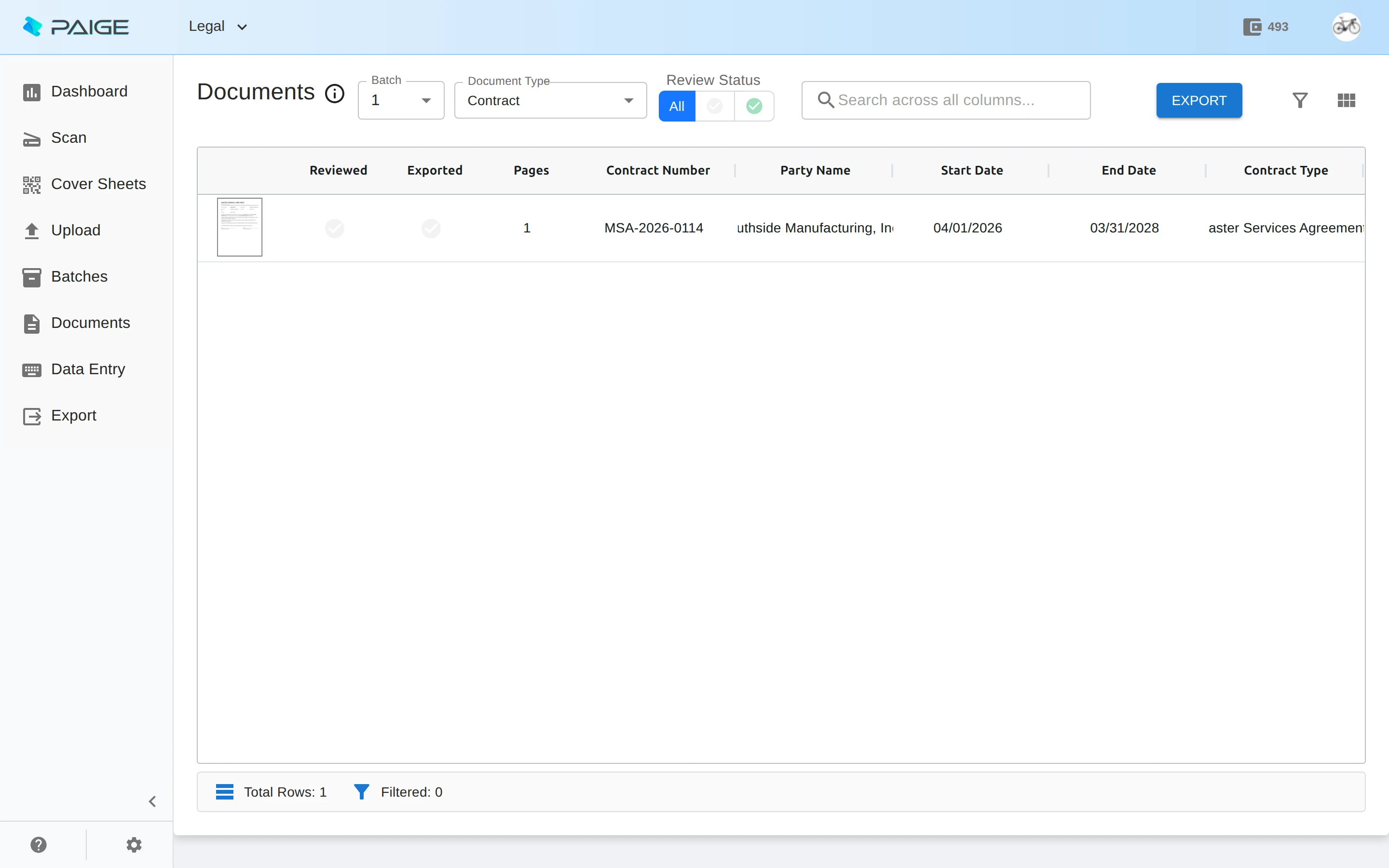
Send Paige the agreements you already have. It learns your documents from a few samples and pulls the contract number, the other party, the start and end dates and the contract type from each one, ready to load wherever you track renewals.
SaaS invoices, down to the seat.
A software company’s AP queue is mostly other software companies: seats, prorated true-ups, usage over plan, annual prepayments. The header total is the easy part. The lines are where the money goes.
Paige splits, sorts and reads each invoice and returns the fields and every line item as clean data, by webhook into your own systems, by SFTP, or as a download. It runs on Google Cloud, encrypts data at rest, keeps each company’s data apart, and lets you choose how long each job keeps documents after export.
Onboarding a remote engineer still makes paper.
The offer letter and the invention assignment get signed electronically. Then a Form I-9 is completed with an authorized representative in another city and comes back as a scan, a state withholding form arrives the same way, and the benefits enrollment lives in a different system. In Nucleus One, signatures in order and a project per new hire cover the first part; Paige reads the scans that come back, so nobody retypes a name or a date.
- 01Offer letter, signed
- 02Proprietary information and invention assignment (PIIA)
- 03Form I-9 and its supporting documents
- 04Form W-4 and state withholding
- 05Benefits enrollment
- 06Handbook and security policy acknowledgements
One renewal, from reminder to signed.
The order form from the top of the page, with Nucleus One holding the vendor project and Paige reading the invoices. Sample data, start to finish.
- Sep 17 08:00workflowReminder to the controller and budget owner: OF-2025-118 (Lumen Metrics) passes its notice deadline on Oct 17.
- Sep 18 10:12budget ownerOpens the vendor project: MSA, DPA and the order form. Pulls up the seat lines Paige read from every invoice since January.
- Sep 18 10:20budget ownerSeats billed: 140. Seats in use in the admin console: 96. Asks procurement to renegotiate.
- Sep 24 14:05securityConfirms the vendor report on file covers the current period. Requests the missing bridge letter.
- Oct 9 16:40procurementSends the revised order form for signature: the vendor first, then your CFO.
- Oct 10 09:02Nucleus OneBoth signatures in. The signed copy is saved as a new version of the order form, with the full signing history.
The audits and laws that ask for these documents.
- Your own SOC 2 examination
- If you are preparing for a SOC 2 report of your own, your auditor samples evidence: vendor reviews, signed policy acknowledgements, onboarding and offboarding records. A library with permissions and an activity history turns each request into a search.
- GDPR Article 28 and US state privacy laws
- GDPR requires a written contract with every processor that handles personal data for you, and laws such as California’s CCPA set required terms for service provider contracts. Keep each DPA in the vendor’s file, next to the MSA it amends.
- Revenue recognition (ASC 606)
- Revenue starts with an enforceable contract, so your auditors will ask for the executed order form behind each deal. File it the day it is signed, with the customer and term as fields.
- Form I-9 retention
- Keep each employee’s Form I-9 for three years after the date of hire or one year after employment ends, whichever is later. A retention period on the document type does the math.
- SOX, for public companies
- Contract approvals, vendor onboarding and AP sign-offs become evidence for internal controls. Approvals and activity history give you SOX-ready audit trails without screenshots in a spreadsheet.
Ademero has served 1,000+ organizations since 2002. Fortune 500 companies and government agencies review its security every year and keep renewing.
Keep reading
- Contract management
Agreements approved, signed, versioned and found
- HR onboarding
Offer letters, I-9s and policies without the paper chase
- Invoice processing
Vendor bills read, routed and filed
- Document data extraction API
Guide: getting clean data from documents into your systems
- Invoice line-item extraction
Guide: seats, usage and every other line
- HR onboarding document capture
Guide: the onboarding packet, document by document
- Invoice approval matrix
Template: who approves which SaaS spend
- Records retention policy
Template: periods by record type
- Developers
APIs and webhooks
Start with the contracts, or start with the invoices.
Agreements, signatures, renewals
Create a Nucleus One account and bring in your first agreements in minutes.
Start Nucleus One freeInvoices and other documents to data
Send Paige a few samples and see the fields and lines come back.
Start Paige freeTalk it through
A free live demo on your own agreements and invoices, including Content Central in the cloud or on your own servers.
Book a free demo